What Is Easy2Quote?
Easy2Quote is a new integration between AMS (Agency Management System) and Capital Premium Finance. In practical terms, it's a pop up that appears inside AMS, right after you save a policy, offering to start a premium financing quote with Capital Premium Finance for that same policy, without you having to open a separate system or start a separate conversation.
Here's what it looks like when it appears:
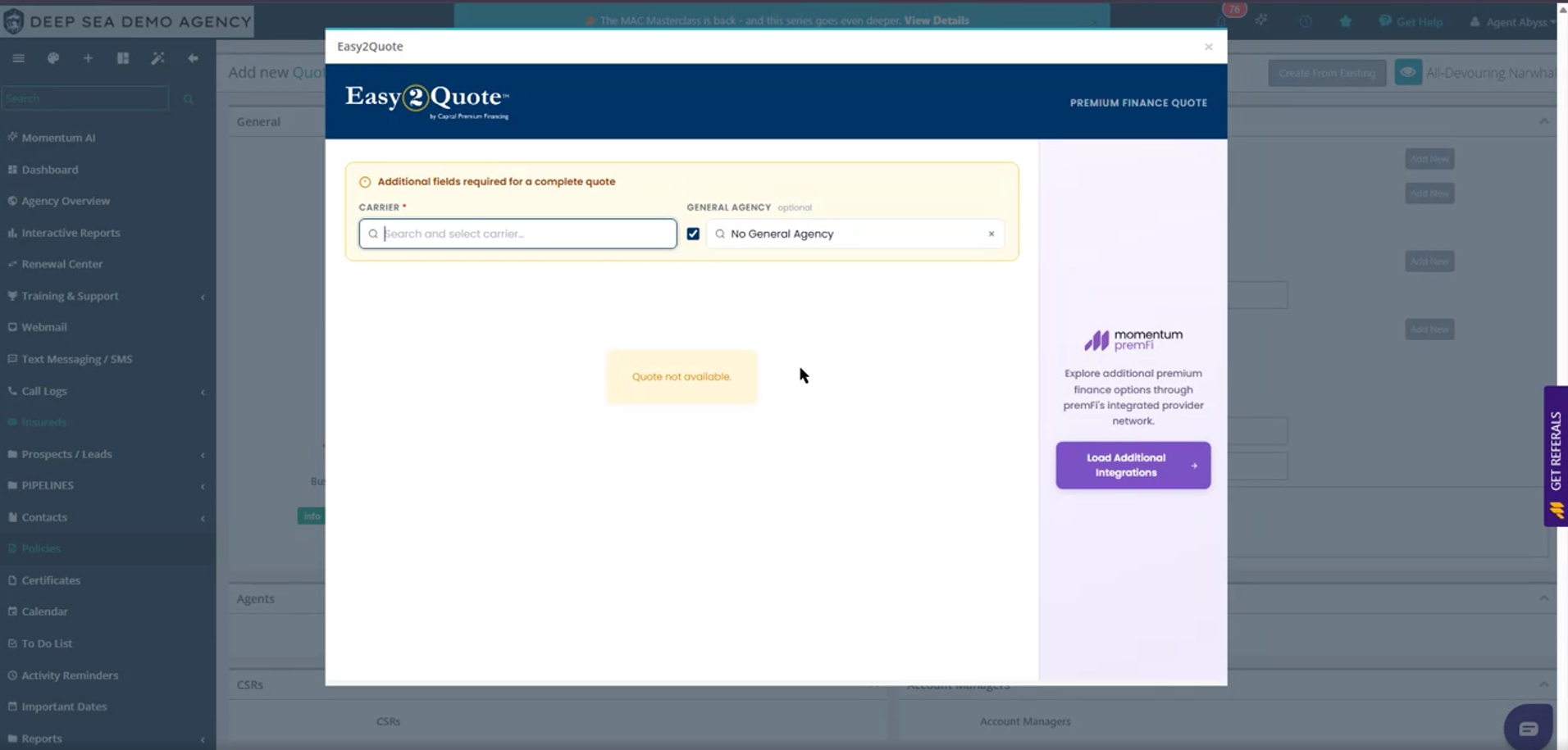
Easy2Quote fetching a Capital Premium Finance quote right after a policy is saved.
The pop up itself is just the entry point. The actual quote is built inside PremFi, Momentum AMP's own premium finance platform, so the client and policy information you already entered in AMS carries over automatically.
How This Integration Saves You Time
Today, getting a client set up on premium financing usually means stepping outside the policy you're working on: a separate quote, a separate login, or a separate conversation you have to remember to start. Every one of those extra steps is manual work for your team, and a chance for a financing opportunity to fall through the cracks.
Easy2Quote removes that friction by watching for two things automatically on every policy saved in AMS:
The billing type on the policy is set to Agency Bill with Outside Financing.
The policy's premium is at or above a minimum amount your agency sets.
When both are true, the pop-up appears on its own and starts pulling together a Capital Premium Finance quote: retrieving the policy premium, calculating finance options, and preparing it for you to review and complete in PremFi.
What that means for your agency, day to day:
No agent has to remember which policies qualify. AMS decides, based on the minimum premium you configure, and surfaces the offer automatically the moment a saved policy clears that bar.
You control the threshold. Raise the Minimum Policy Amount if you only want financing offered on larger policies, or lower it if you want it offered more often, so the tool fits how your agency already works.
The quote lives inside PremFi, tied to the same client and policy record, instead of a separate spreadsheet, email thread, or third-party portal. Less double entry, faster path from quoted to financed.
Nothing about how you build a policy changes. Agents fill it out the same way they always have. Easy2Quote simply meets them right after they save it.
The result: one less manual step per qualifying policy, applied consistently across your whole agency, not just when an agent happens to think of it.
Why Capital Premium Finance
Capital Premium Finance is the financing partner built directly into Easy2Quote. Instead of sending a client to a separate financing company or a different system, the quote is generated and completed right inside PremFi, Momentum AMP's own premium finance platform, which connects out to Capital as one of its integrated providers.
That's the extent of what makes Capital "the" option here: it's the one already wired into your policy workflow. Everything else that would normally make the case for choosing Capital (rates, approval speed, agency commission, track record) isn't something we can speak to yet, since it's not part of the walkthrough this article is based on. That would need to come directly from Capital or from Kayden before it's added here.
How It Works, Step by Step
Step 1: Open Agency Profile
In AMS, open the menu in the top right corner and select Agency Profile. This is where the feature is configured, once, for your whole agency.
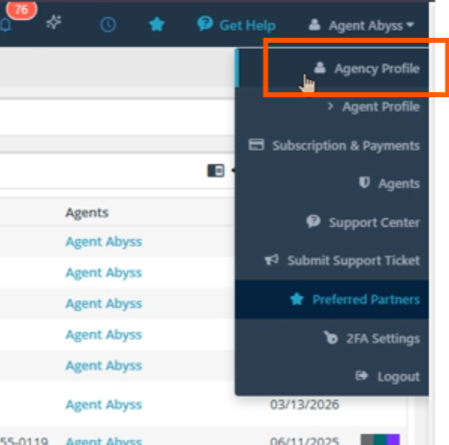
Step 2: Go to Configure API
From Agency Profile, click Configure API,
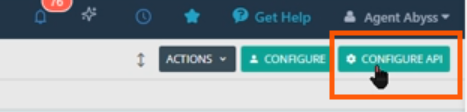
Then scroll down until you reach the section labeled Capital Finance Easy2Quote.
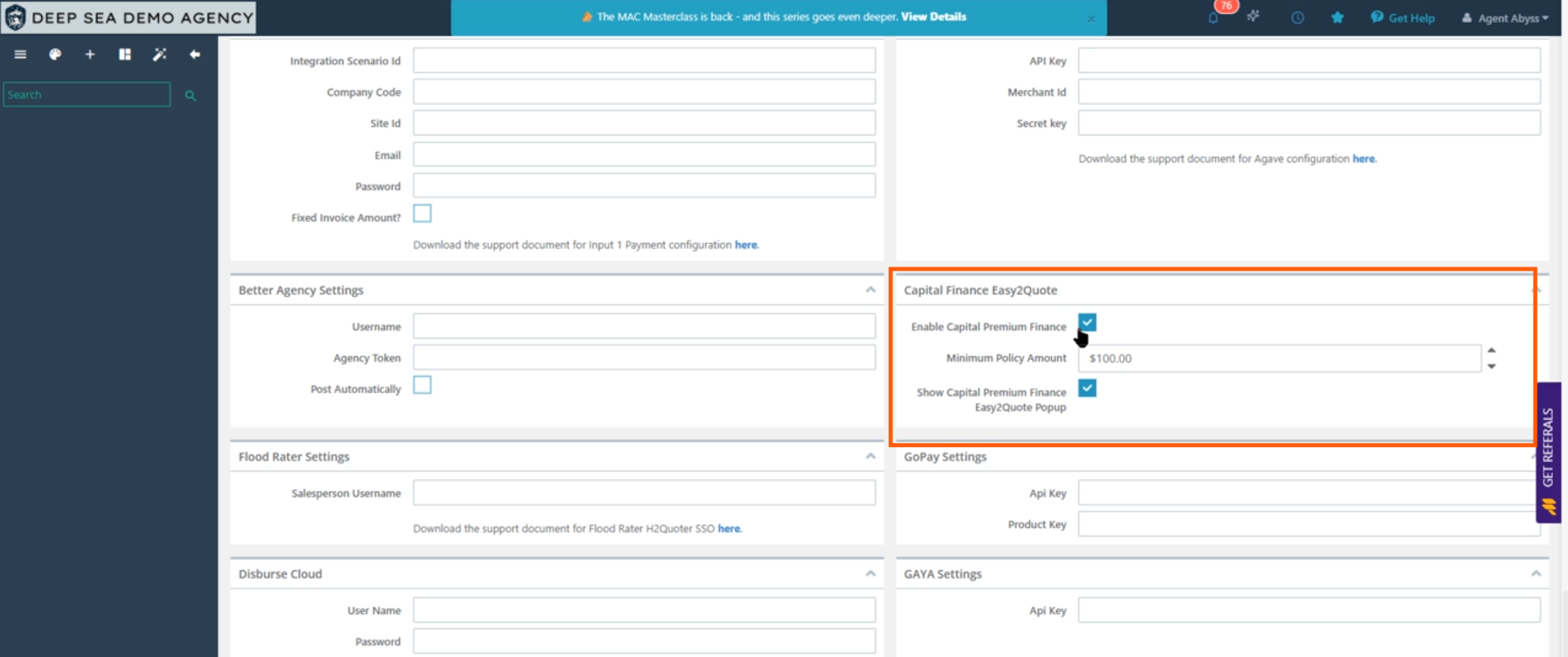
The Capital Finance Easy2Quote settings, tucked inside Configure API.
Turn on the feature and set your minimum, three fields control the whole feature:
Enable Capital Premium Finance: the master switch. If this is off, Easy2Quote never appears, no matter what else is configured.
Minimum Policy Amount: the premium floor for the pop up to trigger. For example, if this is set to $100, a policy with a $99 premium will not show the offer, but a $150 policy will.
Show Capital Premium Finance Easy2Quote Popup: a second, separate switch that also has to be on for the pop-up to actually display. Turning on Capital Premium Finance alone is not enough; both switches need to be checked.
Once these are set, setup is done. Everything from here happens automatically while you work on policies.
Step 3: Set the billing type on the policy
In the policy's Endorsements and Fees section, the Billing Type dropdown has several options. Easy2Quote only fires when this is specifically set to Agency Bill with Outside Financing. Any other billing type (Direct Bill, standard Agency Bill, and so on) will not trigger the pop up, even if the premium is well above your configured minimum.
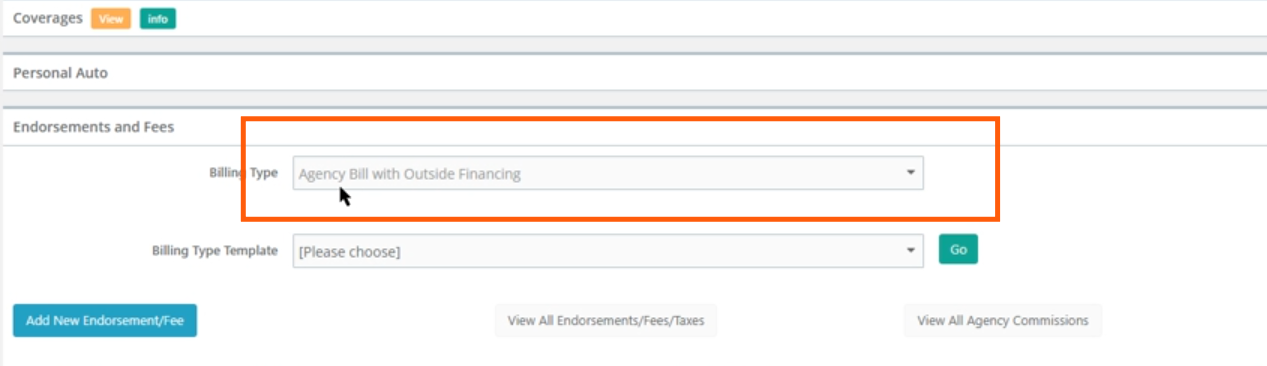
Billing Type set to "Agency Bill with Outside Financing," the one setting that has to be right for Easy2Quote to trigger.
Step 4: Add the endorsement or fee and generate the transaction
With the billing type set, add whatever endorsement or fee applies to the policy the same way you normally would, and click Generate Transaction to have AMS calculate the totals.
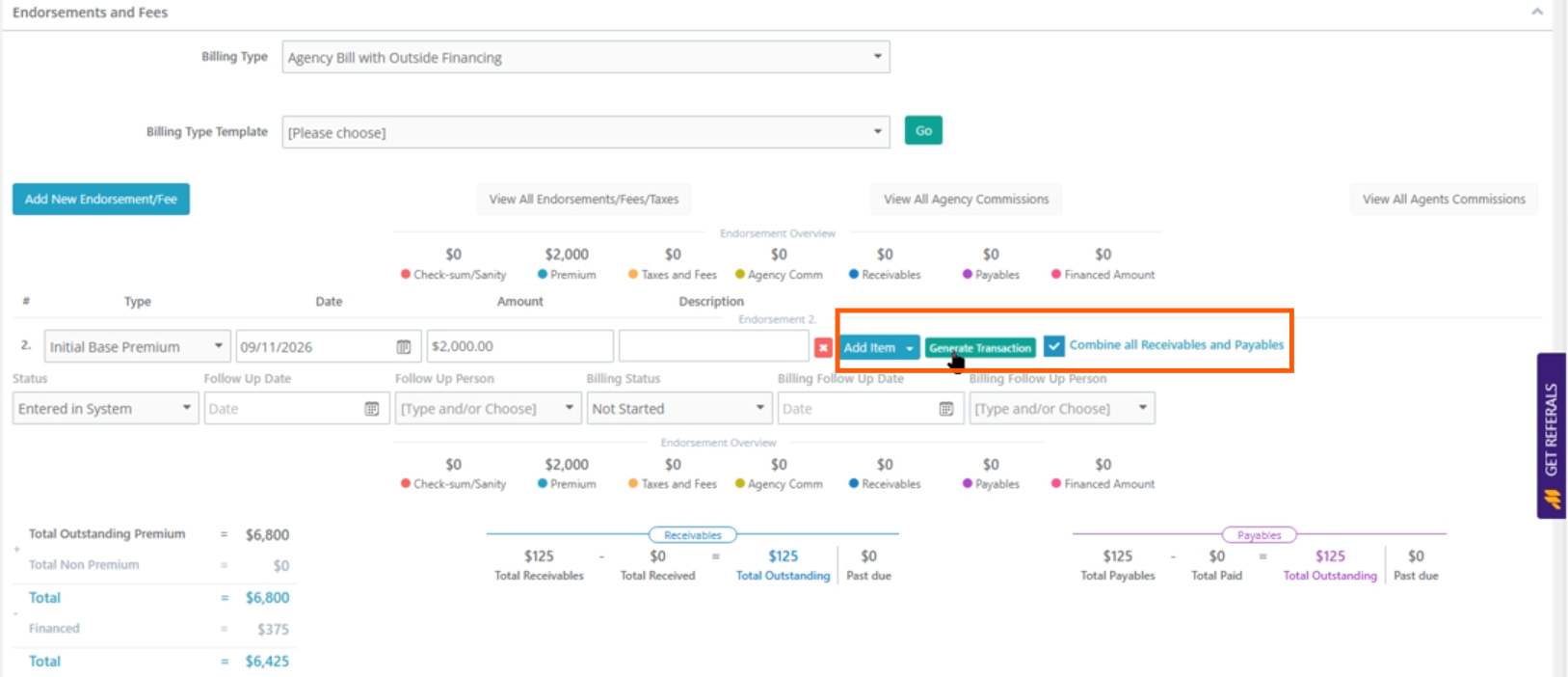
Adding the item and hitting Generate Transaction.
Step 5: Click Update
Once the transaction is generated, click Update to save the policy. This is the step that actually triggers Easy2Quote.
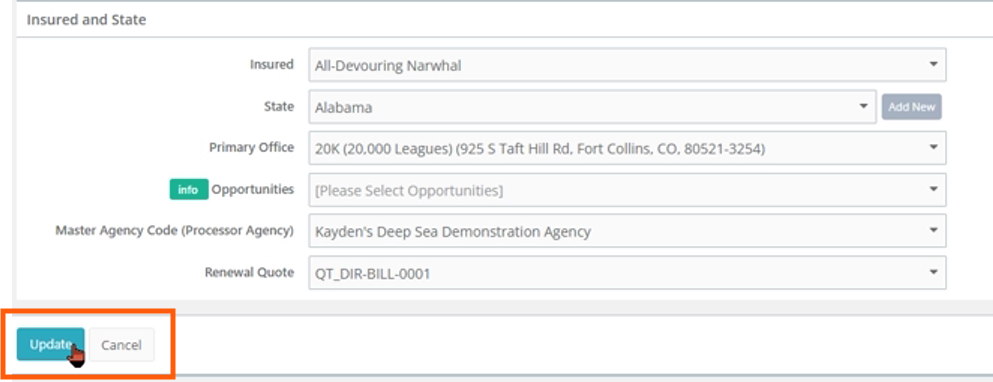
Update in progress, right before the Easy2Quote pop-up appears.
If the billing type is correct and the premium clears your minimum, the Easy2Quote pop-up appears automatically on screen. There's no separate button to click to launch it.
Step 6: Complete the quote
Inside the pop up, select a Carrier (required) and, optionally, a General Agency, which is how Easy2Quote refers to an MGA (Managing General Agency) if one is involved in placing the policy. By default this is set to "No General Agency."
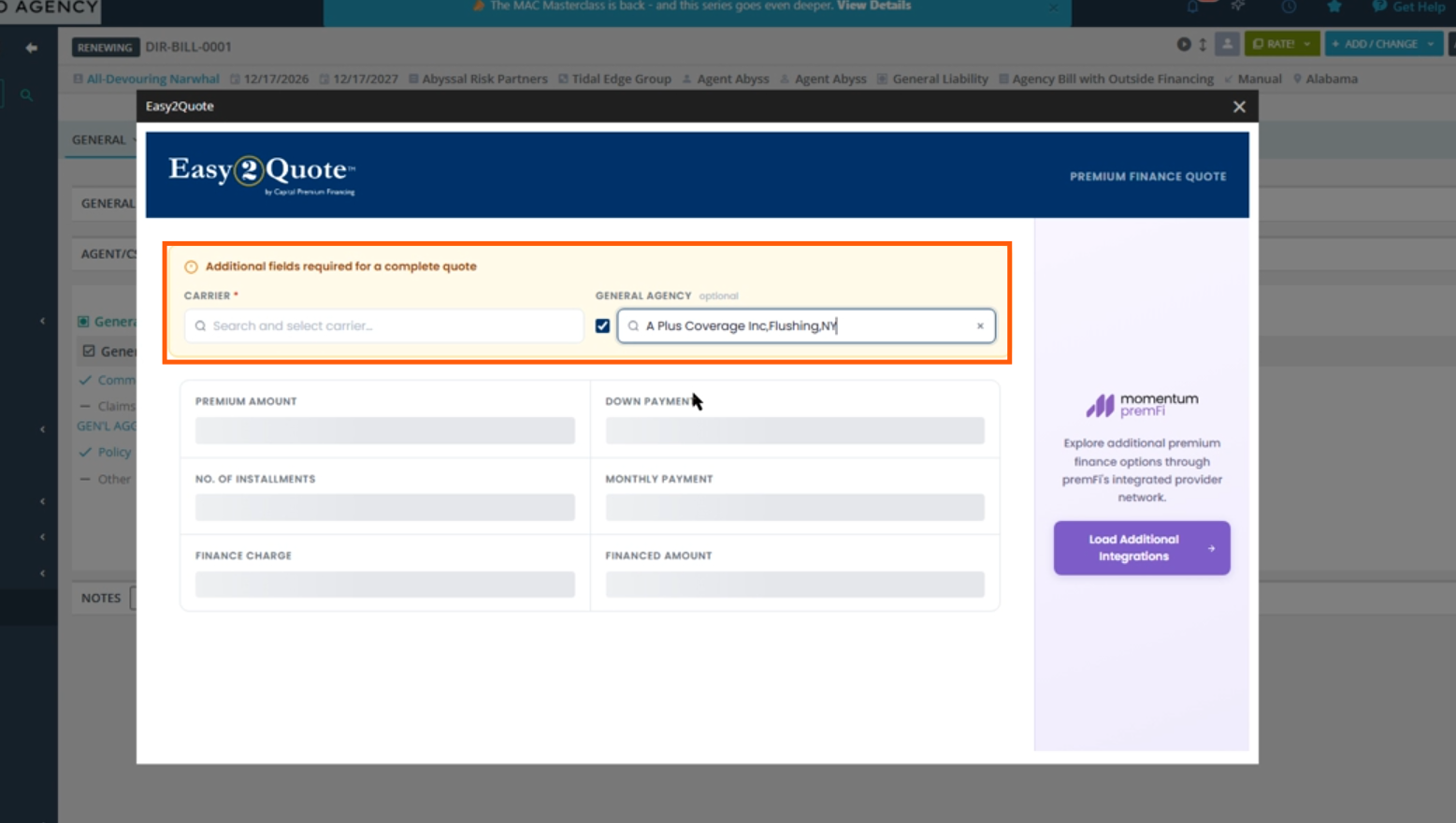
.
Inside PremFi shows a running Total Premium for the quote, calculated from the policy's endorsement amount, so you can confirm it matches what you generated back in AMS before submitting.
Conclusion
Easy2Quote brings Capital Premium Finance directly into the policy workflow you already use in AMS: no separate system, no separate login, and no remembering to bring up financing on your own. Once it's configured in Agency Profile, it works quietly in the background and only shows up when a policy actually qualifies, based on the billing type and minimum premium you set.
From there, the process is straightforward: build the policy as you normally would, generate the transaction, and click Update. If the policy qualifies, Easy2Quote takes over from there, carrying your policy details into a PremFi quote so nothing has to be entered twice.
The result is one less separate step for agents, and a more consistent way to offer premium financing exactly when it makes sense for a client's policy.
Questions? Reach out to your Momentum AMP product contact with anything about Capital Premium Finance Easy2Quote.
This article reflects Easy2Quote's current configuration and workflow as of this writing.
Was this article helpful?
That’s Great!
Thank you for your feedback
Sorry! We couldn't be helpful
Thank you for your feedback
Feedback sent
We appreciate your effort and will try to fix the article