QuoteLinqs are insured-facing application links in Momentum CL RATE. They allow insureds and prospects to complete or update application information through a branded digital experience. QuoteLinqs can be connected to an application you have already started or used as a blank application for new quote opportunities.
What Is a QuoteLinq?
A QuoteLinq is a digital application link that allows an insured or prospect to provide commercial application information directly.
The insured-facing experience can include:
- Your agency name and logo
- Custom brand colors and presentation
- A professional digital application experience
- A streamlined way for your agency to collect application information
QuoteLinqs are designed to help agencies collect the information needed for a commercial submission while providing the insured with a branded experience.
Using a QuoteLinq with an Existing Application
A QuoteLinq can be created from an application that you have already started in Momentum RATE.
This allows you to begin the application, enter any information you already have, and then allow the insured to provide or update additional information.
When the insured completes information through the QuoteLinq, their answers are reflected back in the application on your side in Momentum RATE.
This can be especially useful when you have already started gathering information but need the insured to complete portions of the application.
Using a Blank QuoteLinq
You can also create a blank QuoteLinq.
A blank QuoteLinq allows a prospect or insured to begin the application themselves rather than requiring your agency to start the application first.
Blank QuoteLinqs can be used as:
- A Copy Quote Linq link on your agency website

- A link in an email campaign
- A link in a client portal
- A general commercial insurance intake form
Using QuoteLinq on Your Agency Website
One use for a blank QuoteLinq is to place it behind a Copy Quote Linq button on your agency website.
A visitor can select the button and begin entering the information needed for the commercial application.
Once submitted, the information flows into Momentum RATE, where your team can review the submission and continue the quoting process.
What Does the Insured See?
The insured sees a branded application experience that can include your agency's:
- Logo
- Colors
- Messaging
The QuoteLinq experience is designed to be easy to complete across devices while allowing your agency to collect application information digitally. 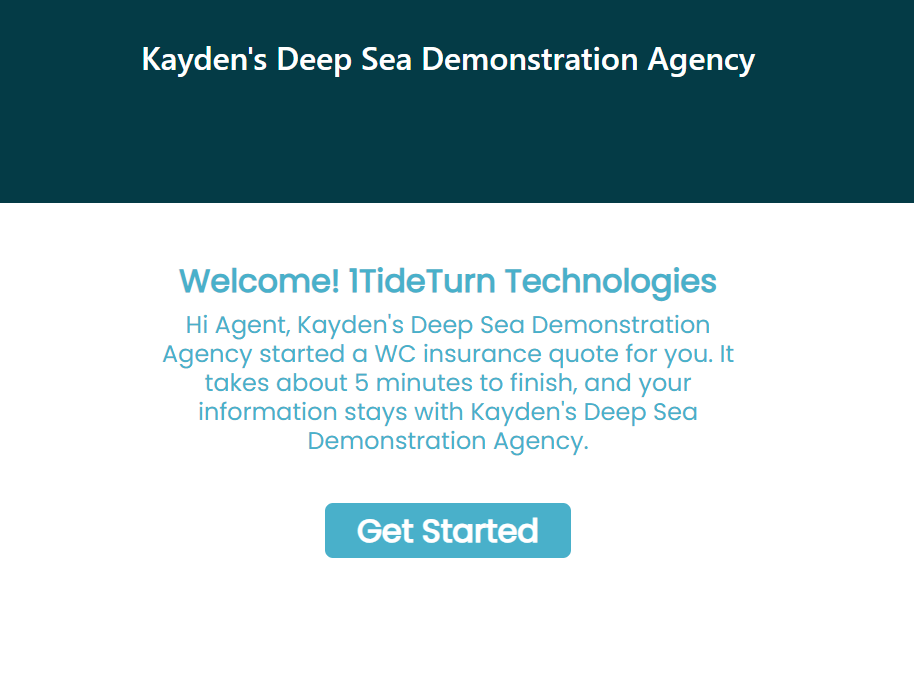
What Happens to the Information?
For a QuoteLinq connected to an existing application, information entered by the insured is reflected back into the application in Momentum RATE.
For a blank QuoteLinq, the submission flows into Momentum RATE so your agency can review the information and continue with the quoting process.
Important: Always review the information provided through a QuoteLinq before submitting the application to carriers. The QuoteLinq helps collect information from the insured, but your agency should still review the completed application as part of the submission process.
Existing Application or Blank QuoteLinq?
Use an Existing Application QuoteLinq when:
- You have already started the commercial application.
- Some information is already available.
- You need the insured to complete or update additional information.
Use a Blank QuoteLinq when:
- You want the insured or prospect to begin the application.
- You want to provide a Get a Quote option on your website.
- You want to use a link for new-business intake.
- You want to distribute an application through an email campaign or client portal.
Best Practices
- Use the appropriate type of QuoteLinq. Use an existing application when work has already begun or a blank QuoteLinq when the insured will initiate the application.
- Use blank QuoteLinqs as an intake option. They can be used on your website, in email campaigns, or through a client portal.
- Review completed information before submitting. Confirm the information received from the insured is accurate and complete.
- Take advantage of agency branding. QuoteLinqs provide a branded experience using your agency's logo, colors, and messaging.
Summary
QuoteLinqs provide a way for insureds and prospects to enter commercial application information directly into a workflow connected with Momentum RATE.
An Existing Application QuoteLinq allows an insured to complete or update an application your agency has already started. A Blank QuoteLinq allows the insured or prospect to initiate the application and can be used as a website Get a Quote link, email campaign link, client portal link, or general intake form.
Once information is received, your agency can review it in Momentum RATE and continue the commercial quoting process.
Was this article helpful?
That’s Great!
Thank you for your feedback
Sorry! We couldn't be helpful
Thank you for your feedback
Feedback sent
We appreciate your effort and will try to fix the article