Momentum Commercial Lines RATE (CL RATE) is an integrated commercial rating platform that works directly with Momentum AMS. It helps agencies reduce duplicate data entry, submit applications to multiple markets, access both direct appointments and wholesale opportunities, and manage commercial quote results through one connected workflow.
What Is Momentum CL RATE?
Momentum CL RATE brings the commercial quoting process into the Momentum ecosystem.
Instead of repeatedly entering the same information into different carrier portals, agents can begin with information already available in Momentum AMS, complete the commercial application, identify available markets, submit the risk, review returned quotes, and move the submission toward binding.
CL RATE is designed to make commercial quoting faster, more connected, and easier to manage.
What Can You Do with CL RATE?
With Momentum CL RATE, agencies can:
- Quote commercial lines from one platform.
- Submit one application to multiple carriers.
- Pull available information directly from Momentum AMS.
- Push selected quote information back into Momentum AMS.
- Configure carriers where the agency has a direct appointment.
- Access additional wholesale markets through MomentumWIN.
- Use AI-assisted NAICS lookup.
- Check carrier appetite.
- Create insured-facing QuoteLinqs.
- Download quote documents.
- Request binding or bridge to carrier portals when necessary.
How CL RATE Works with Momentum AMS
One of the primary benefits of CL RATE is its connection with Momentum AMS.
You can access RATE from the AMS navigation or begin from an existing Policy, Client, Insured, or Prospect record. When you start from an existing record, available information from Momentum AMS can be pulled into the RATE workflow.
This reduces the need to recreate records or repeatedly enter information that your agency already maintains in the AMS.
The Basic Workflow
Momentum AMS → CL RATE → Application → Appetite & Markets → Carrier Submission → Quote Results → Binding / AMS
The exact workflow may vary depending on the line of business and carrier, but the goal is to maintain a connected process from the initial AMS record through quoting and binding.
Direct Appointments and MomentumWIN
CL RATE provides agencies with two ways to access commercial markets.
Direct Appointments
If your agency has a direct appointment with a supported carrier, you can configure that carrier within Carrier Settings and enter the required credentials.
Once configured, that carrier can be included when appropriate risks are submitted through RATE.
MomentumWIN
MomentumWIN provides access to additional wholesale commercial markets.
MomentumWIN can be used when:
- Your agency does not have a direct appointment with a carrier.
- You need additional markets for a risk.
- The risk does not fit the appetite of your direct carriers.
- You want additional options to present to the insured.
Business bound through MomentumWIN is subject to an 80/20 commission split, with the agency receiving 80% and MomentumWIN receiving 20%.
What Are QuoteLinqs?
QuoteLinqs provide a way for the insured to participate in completing the commercial application.
An agency can create an insured-facing QuoteLinq that allows the client to provide application information while keeping the process connected to the agency's RATE workflow.
This can reduce back-and-forth communication and manual data entry when gathering information needed to complete a submission. The RATE source describes QuoteLinqs as insured-facing links that allow clients to complete applications while maintaining agency branding.
What Happens After a Quote Is Submitted?
Once carrier responses are returned, agents can review the available quote results within Momentum RATE.
Depending on the carrier or market, agents may be able to:
- Review returned quotes.
- Download quote documents.
- Send selected quote information back to Momentum AMS.
- Bridge to the carrier's website.
- Continue the binding process.
Binding options vary by carrier. Some carriers may support binding within the RATE workflow, while others require the agent to bridge to the carrier portal. MomentumWIN quotes use a Request to Bind process.
Getting Started with CL RATE
Before submitting your first commercial application:
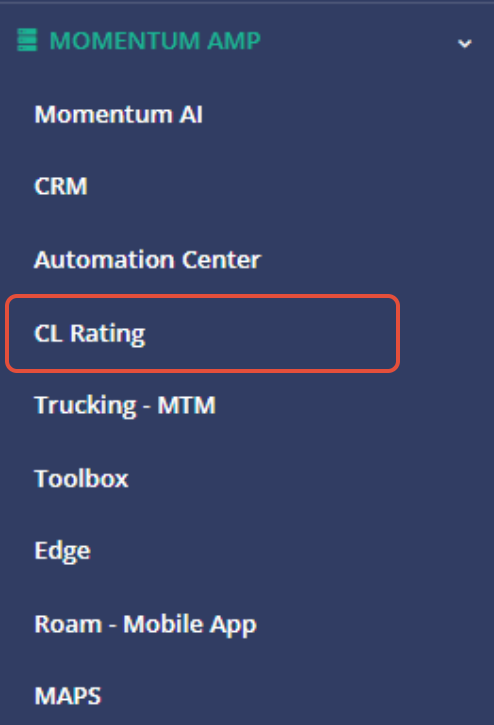
- Access Momentum RATE from Momentum AMS.
- Configure your Carrier Settings.
- Add credentials for your applicable direct carrier appointments.
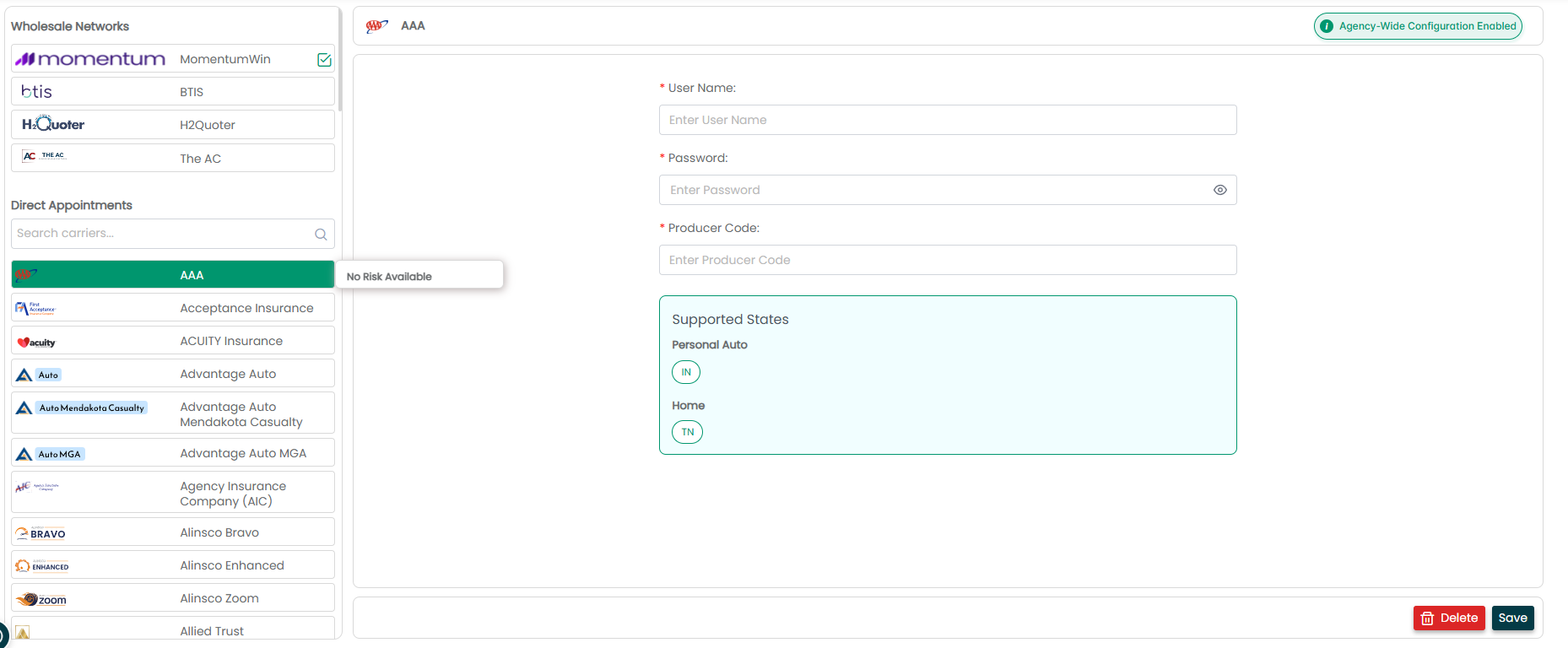
- Review available MomentumWIN wholesale markets.
- Start a quote and select the appropriate line of business.
- Search for an existing AMS record or create a new record.
- Complete the application and review available markets.
- Submit the application.
- Review returned quotes.
- Send applicable quote information back to Momentum AMS and proceed with documents or binding.
Best Practices
- Configure carriers first. Complete your carrier setup before beginning your first submission.
- Start with existing AMS records whenever possible. This allows RATE to use information your agency has already entered.
- Review appetite before submitting. This can help identify appropriate markets for the risk.
- Use QuoteLinqs when client input is needed. They provide a structured way to collect application information.
- Review returned information before sending it back to the AMS.
- Use the current Carrier Guide for availability. Carrier and state availability can change, so do not rely on older carrier lists or previously saved information.
Summary
Momentum CL RATE connects commercial quoting with Momentum AMS so agencies can manage more of the submission process from one workflow.
By combining AMS data, direct carrier appointments, MomentumWIN wholesale access, appetite checking, QuoteLinqs, quote results, and binding workflows, CL RATE helps reduce duplicate work and provides a more connected commercial quoting process.
Was this article helpful?
That’s Great!
Thank you for your feedback
Sorry! We couldn't be helpful
Thank you for your feedback
Feedback sent
We appreciate your effort and will try to fix the article