Before submitting your first commercial application in Momentum CL RATE, your agency should complete a few initial steps. This includes accessing RATE from Momentum AMS, configuring your carrier settings, reviewing your direct and MomentumWIN market options, and understanding the basic quoting workflow.
Before You Begin
Momentum CL RATE works directly with Momentum AMS. You can use existing AMS information to begin a commercial submission rather than entering the same information into a separate rating platform.
Before running your first quote, make sure you have access to Momentum RATE and the appropriate carrier information or credentials for the markets your agency plans to use.
Step 1: Access Momentum RATE
From Momentum AMS:
- Locate the Momentum AMP option in the left navigation menu.
- Expand the menu.
- Select Rate or CL Rating.
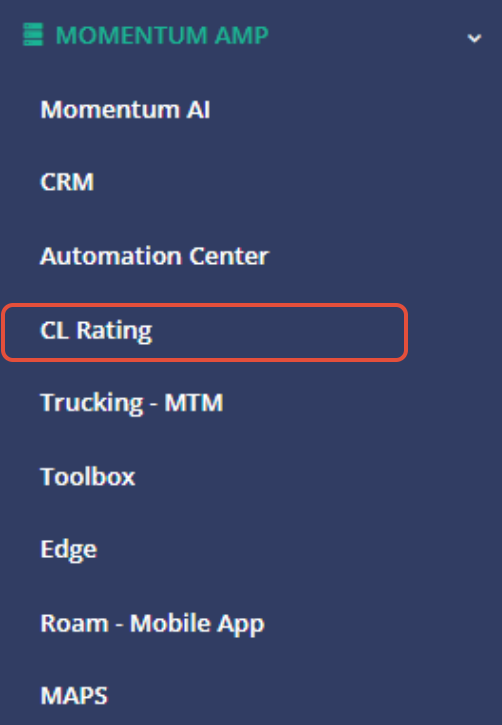
You can also access RATE from certain records within Momentum AMS, including a Policy, Client, Insured, or Prospect.
Starting from an existing AMS record allows available information associated with that record to be pulled into the RATE workflow.
Step 2: Configure Your Carriers
One of the first things your agency should do in Momentum RATE is configure its carriers.
From RATE:
- Open Carrier Settings.
- Review the available Wholesale Networks and Direct Appointments.
- Configure the applicable direct carrier appointments.
- Enter the required carrier credentials.
- Confirm that your carrier connections are properly configured.
Carrier setup determines which of your agency's direct appointments can be used when submitting eligible risks through RATE.
Best Practice: Complete your carrier configuration before beginning your first application. This helps ensure your available markets are ready when you reach the submission process.
Step 3: Review MomentumWIN Markets
In addition to direct carrier appointments, CL RATE provides access to wholesale markets through MomentumWIN.
MomentumWIN can provide additional market options when:
- Your agency does not have a direct appointment.
- Additional markets are needed.
- A risk does not fit the appetite of your direct carriers.
- You want to explore additional commercial market opportunities.
Business placed through MomentumWIN is subject to an 80/20 commission split, with the agency receiving 80% and MomentumWIN receiving 20%.
Step 4: Start a Quote
Once your carrier settings are configured, you can begin a commercial quote.
The basic process is:
- Start a new quote.
- Select the appropriate Line of Business.
- Search for an existing Momentum AMS record or create a new record.
- Launch the application.
- Complete the required application information.
- Review the available markets and appetite results.
- Submit the application.
Information already available in Momentum AMS may be pulled into the application, reducing the amount of information that needs to be entered manually.
Step 5: Review Returned Quotes
After the application has been submitted, review the returned carrier results in Momentum RATE.
Depending on the carrier or market, you may be able to:
- Review returned quotes.
- Download quote documents.
- Send selected quote information back to Momentum AMS.
- Bridge to the carrier portal.
- Begin the binding process.
The available options can vary by carrier and market.
Getting Started Checklist
Before completing your first CL RATE submission, confirm that you have:
- Accessed Momentum RATE from Momentum AMS.
- Configured your carrier settings.
- Added direct appointment credentials where applicable.
- Reviewed available MomentumWIN markets.
- Selected the appropriate line of business.
- Selected or created the appropriate AMS record.
- Completed the application.
- Reviewed available markets.
- Submitted the application.
- Reviewed returned quotes.
- Sent applicable quote information back to Momentum AMS.
- Downloaded documents or continued to the appropriate binding workflow.
Best Practices
- Configure carriers first. Do this before you begin working on live submissions.
- Use existing AMS records whenever possible. This allows RATE to pull available information into the application.
- Review your market options before submitting. Direct appointments and MomentumWIN provide different ways to access commercial markets.
- Review appetite results. Carrier appetite can help determine which markets may be appropriate for the risk.
- Review returned information before sending it back to the AMS.
- Use the current Carrier Guide. Carrier and state availability can change, so current availability should always be confirmed rather than relying on an older carrier list.
Summary
Getting started with Momentum CL RATE begins with configuring your agency's carrier settings and understanding how RATE connects with Momentum AMS.
Once setup is complete, users can start with an existing AMS record, complete a commercial application, review available markets, submit to carriers, review returned quotes, and continue into the appropriate AMS or binding workflow.
Was this article helpful?
That’s Great!
Thank you for your feedback
Sorry! We couldn't be helpful
Thank you for your feedback
Feedback sent
We appreciate your effort and will try to fix the article