After starting a quote in Momentum CL RATE, complete the application by reviewing information pulled from Momentum AMS and entering any additional information required for the selected line of business. RATE identifies AMS-populated fields, required fields, and line-specific questions to help guide you through the application before submission.
General Questions
The General Questions section collects core information needed for the commercial submission.
Depending on the risk, this may include:
- Business information
- Location information
- Contact details
- Prior coverage
- Business operations
- Risk-specific questions
Complete the applicable information before moving through the remaining sections of the application.
Information Pulled from Momentum AMS
When an application is connected to an existing Momentum AMS record, available information can be pulled directly into RATE.
Fields containing information pulled from the AMS may be highlighted in yellow.
The yellow highlighting allows you to quickly identify information that was automatically populated from Momentum AMS and review it for accuracy before submitting the application. 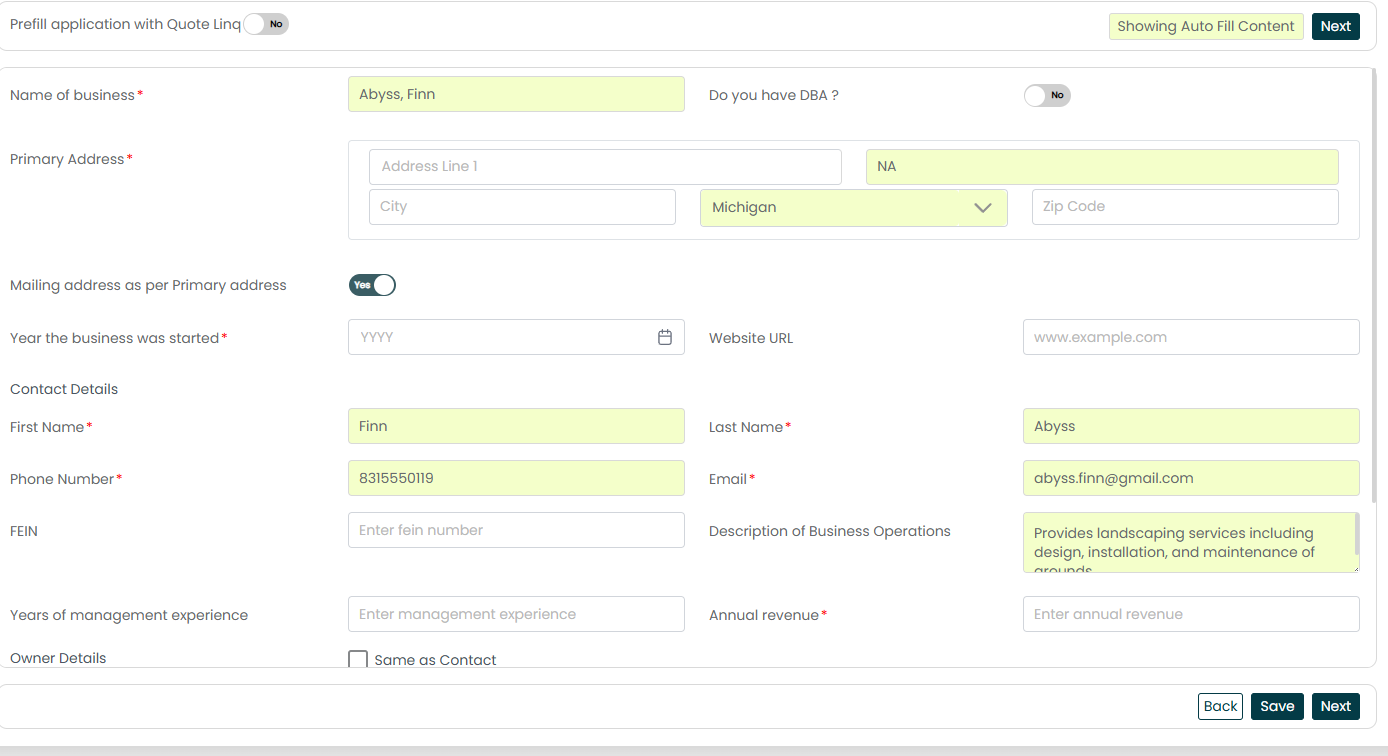
Important: A yellow-highlighted field indicates that the information was pulled from Momentum AMS. Review the information to confirm it is accurate and appropriate for the current submission.
Complete the Line-Specific Sections
The questions displayed in the application will vary based on the line of business being quoted.
The source documentation identifies examples including:
- Workers' Compensation – Payroll and class code details
- General Liability – Operations and exposure questions
- Business Owners Policy (BOP) – Property and business information
- Cyber – Technology and security-related questions
Complete the applicable sections for the selected line of business.
Complete All Required Fields
Required fields are clearly identified throughout the application.
All required fields must be completed before the application can be submitted. If required information is missing, Momentum RATE highlights the missing fields so you can return to them and complete the application.
Review Carrier Appetite
As you work through the application, RATE can display appetite information for available markets.
After selecting the state, available markets may include:
- Direct appointments
- Wholesale markets
- Appetite results
A carrier that appears greyed out appears to be outside appetite based on the quick appetite check.
Carrier availability can change, so appetite and availability should be reviewed as part of the current submission rather than assumed based on a previous quote.
Review the Application Before Submitting
Before submitting the application, review the information for accuracy.
Confirm that:
- Information pulled from Momentum AMS is correct.
- All required fields have been completed.
- Line-specific questions have been answered.
- The selected markets match the risk.
The RATE source specifically recommends reviewing these items before submission, noting that a clean submission can improve quote turnaround and reduce follow-up questions.
Best Practices
- Review yellow-highlighted fields. These fields were populated using information from Momentum AMS and should be confirmed for the current submission.
- Complete all required fields. RATE will identify missing required information that must be completed before submission.
- Pay attention to line-specific questions. The information required for Workers' Compensation, General Liability, BOP, and Cyber will differ.
- Review appetite results. Use the current information displayed in RATE when evaluating available markets.
- Perform a final review before submitting. Confirm the AMS data, required fields, and selected markets are appropriate for the risk.
Summary
Completing a commercial lines application in Momentum RATE combines information already available in Momentum AMS with the additional information required for the specific commercial risk.
Yellow-highlighted fields identify information pulled from the AMS, while required fields and line-specific sections help guide you through the remaining application. Before submitting, review the application for accuracy, make sure all required information is complete, and confirm that the selected markets match the risk.
Was this article helpful?
That’s Great!
Thank you for your feedback
Sorry! We couldn't be helpful
Thank you for your feedback
Feedback sent
We appreciate your effort and will try to fix the article