After submitting a commercial application, returned quotes can be reviewed directly in Momentum CL RATE. Depending on the carrier and market, quote results may include premium, coverage information, quote documents, status updates, and available binding options. From the quote results, you can review the carrier response, download available documents, send selected information back to Momentum AMS, and continue the binding process.
Viewing Returned Quotes
Once carriers return results, you can review the quotes inside Momentum RATE.
Returned quote information may include:
- Carrier name
- Premium
- Coverage details
- Quote documents
- Binding options
- Status updates
The information and actions available may vary depending on the carrier and how the market is accessed.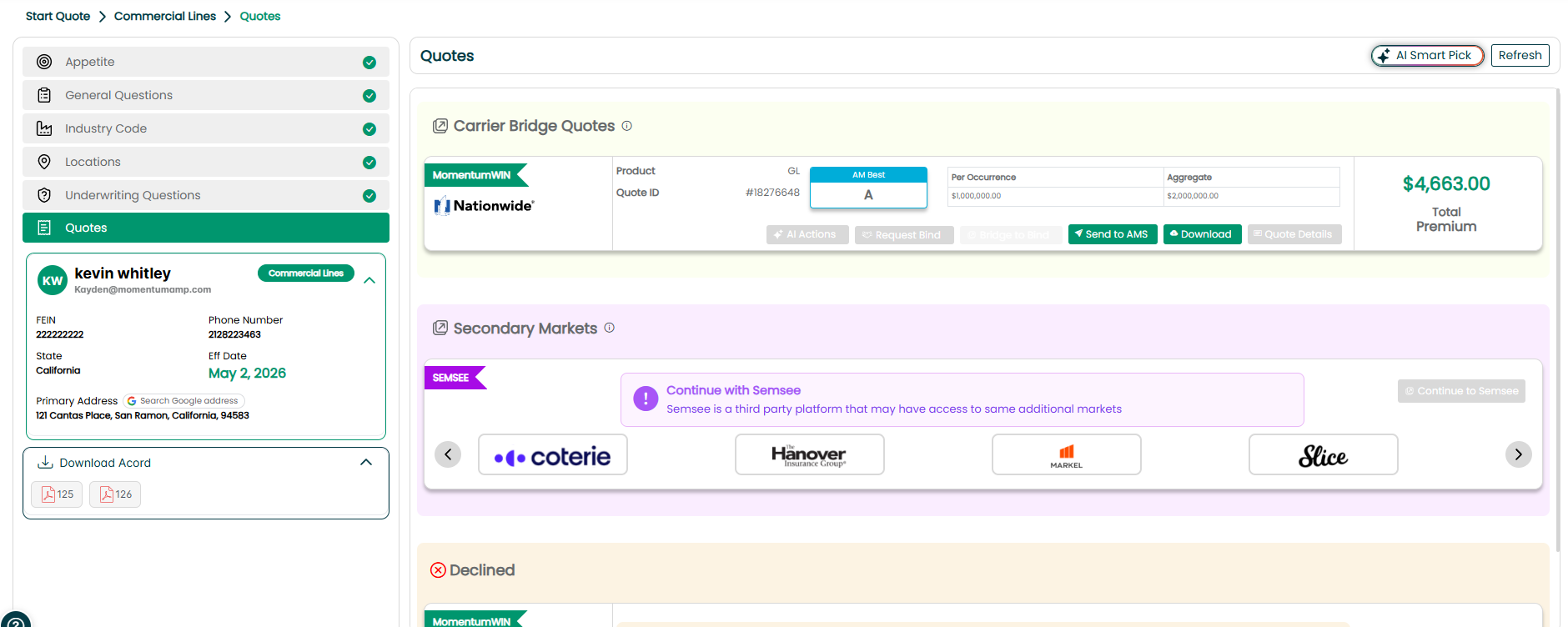
Direct Appointment Quotes
Quotes received through your agency's direct carrier appointments may provide different options depending on the carrier.
Some carriers allow you to continue the binding process directly within Momentum RATE.
Other carriers require you to bridge to the carrier's portal to complete the final binding process.
Follow the available action for the returned quote to continue the process.
MomentumWIN Quotes
Quotes received through MomentumWIN use a different binding workflow.
For a MomentumWIN quote, the action button will display Request to Bind.
Select Request to Bind when you are ready to move forward with the quote. A MomentumWIN representative will then reach out to assist with completing the binding process.
Send Quote Information to Momentum AMS
Once you have reviewed the quote, use Send to AMS to push application and quote information back into Momentum AMS.
This allows you to:
- Store selected quote results in the AMS.
- Keep the AMS record updated.
- Continue managing the policy workflow within Momentum AMS.
Best Practice: Review the quote and application information before selecting Send to AMS to make sure you are sending the appropriate information back to the management system.

Download Quote Documents
When documents are available from the carrier, select Download to download the quote documents.
Downloaded documents can be useful for:
- Reviewing the carrier's quote.
- Presenting quote information to the client.
- Comparing coverage options.
- Maintaining documentation for the agency's records.
Document availability depends on what is returned by the carrier.
Understanding Your Binding Options
Binding options vary by carrier and market.
Direct Appointments
Depending on the carrier, you may be able to:
- Complete the binding process within Momentum RATE, or
- Bridge to the carrier portal to finish binding.
MomentumWIN
For a MomentumWIN quote:
- Select Request to Bind.
- A MomentumWIN representative will assist with completing the binding process.
Important: Not every carrier supports binding directly within Momentum RATE. Follow the binding option displayed with the returned quote.
Best Practices
- Review all returned quote information. Confirm the premium, coverage information, documents, and status before moving forward.
- Download available quote documents. Keep applicable documents available for client presentation, comparison, and agency records.
- Use Send to AMS when appropriate. This keeps selected quote and application information connected with the AMS record.
- Follow the carrier's available binding workflow. Some direct carriers support binding in RATE, while others require you to continue in the carrier portal.
- Use Request to Bind for MomentumWIN quotes. A MomentumWIN representative will assist with the wholesale binding process.
Summary
Returned commercial quotes can be reviewed directly within Momentum CL RATE. Depending on the carrier, results may include premium, coverage details, documents, status information, and binding options.
From the quote results, you can download available quote documents, use Send to AMS to return selected information to Momentum AMS, and continue through the appropriate binding process.
For direct appointments, binding may occur within RATE or through the carrier portal. For MomentumWIN quotes, select Request to Bind to begin the assisted binding process.
Was this article helpful?
That’s Great!
Thank you for your feedback
Sorry! We couldn't be helpful
Thank you for your feedback
Feedback sent
We appreciate your effort and will try to fix the article