When one premium finance agreement covers multiple policies, Momentum needs the financing accounted for at the individual policy level. The Premium Finance Breakdown Calculator can help determine a proportional allocation for each policy. The most important requirement, however, is that when all of the individual policies are added together, the total down payment and total amount financed reconcile to the actual premium finance agreement.
Before You Begin
Have the actual premium finance agreement available before calculating or adjusting the financing.
Also make sure that every policy included in the finance agreement has been entered in Momentum with its:
- Premium
- Taxes
- Fees
These amounts need to be entered before using the Premium Finance Breakdown Calculator.
One Finance Agreement, Multiple Policy Transactions
A premium finance company may provide one agreement that covers several policies.
For example, one agreement could include:
- General Liability
- Commercial Property
- Commercial Auto
The finance company may provide a total down payment and total amount financed for the entire agreement.
Momentum, however, needs the financing accounted for on each individual policy transaction.
This means the total financing needs to be allocated among the individual policies.
The amounts do not have to be divided equally.
The important rule is:
All of the individual policy transactions combined must reconcile to the actual premium finance agreement.
Using the Premium Finance Breakdown Calculator
Momentum includes a Premium Finance Breakdown Calculator to help determine a logical allocation among the policies.
Step 1: Open One of the Policies
Open one of the policies included on the premium finance agreement and select the Billing tab.
At the bottom of the Billing tab, open the Premium Finance Breakdown Calculator.
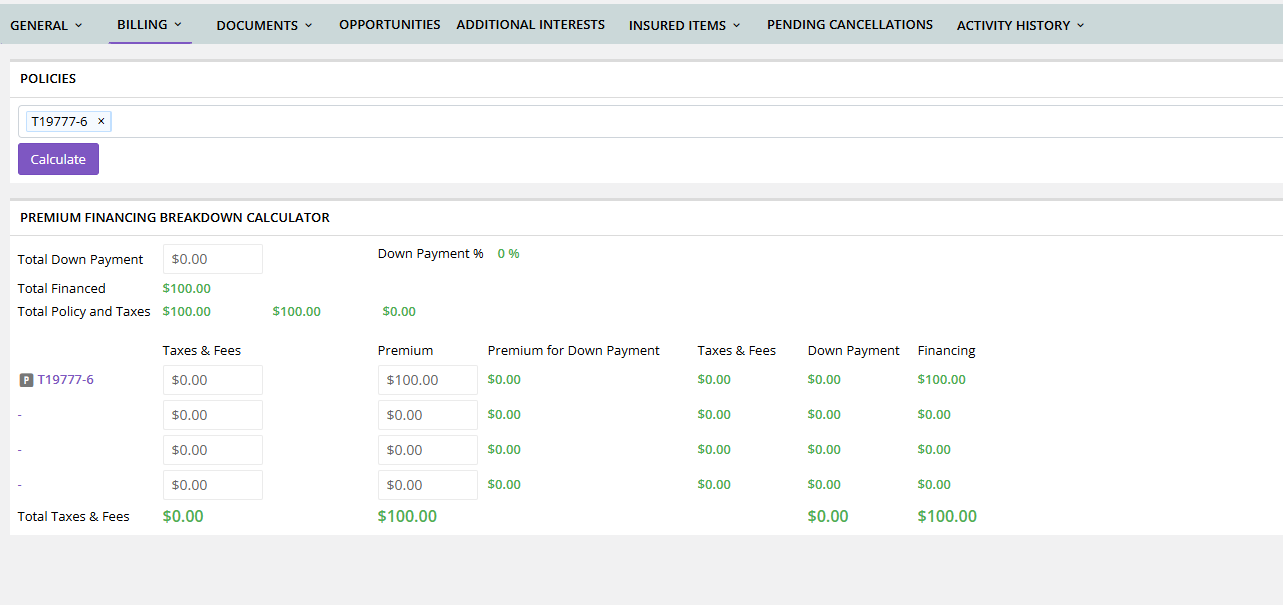
The policy you are currently viewing will already be pre-filled in the calculator.
Step 2: Add the Other Policies
At the top of the calculator, select the other policies included on the same premium finance agreement.
Make sure all policies included in the finance agreement are selected.
Step 3: Enter the Total Down Payment
Enter the total down payment shown on the actual premium finance agreement.
Select Calculate.
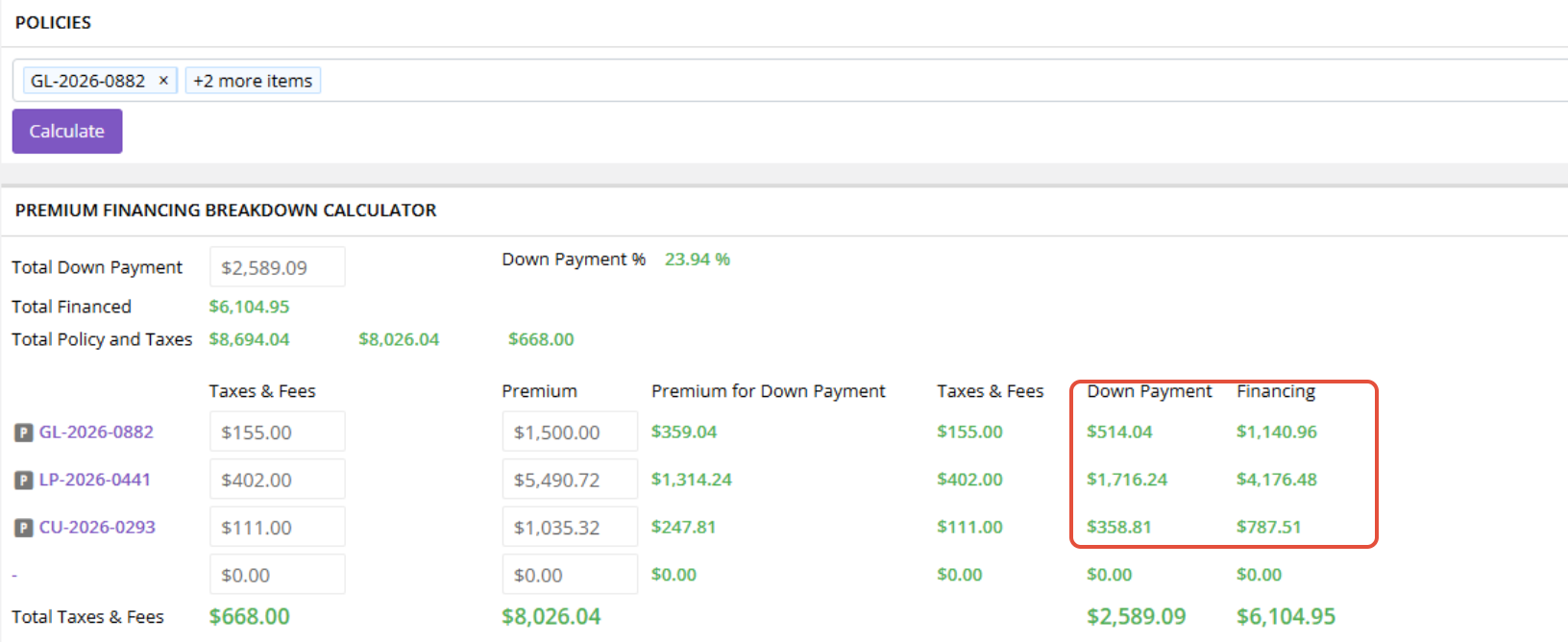
Momentum will calculate a policy-by-policy breakdown.
Step 4: Record the Results
For each policy, record the calculated:
- Down Payment
- Amount Financed
Important: The Premium Finance Breakdown Calculator does not save these results.
Record the amounts for each policy before leaving the calculator.
How Does the Calculator Allocate the Agreement?
The Premium Finance Breakdown Calculator provides a logical, proportional allocation based on the policies included in the agreement.
For example, if one policy represents approximately 80% of the applicable premium, the calculator will allocate approximately 80% of the applicable financing amounts to that policy.
The calculator provides a recommended way to create a sensible allocation, but it is not the only mathematically possible way to divide a multi-policy finance agreement.
The ultimate test is whether all of the policies together reconcile to the actual finance agreement.
Enter the Allocation on Each Policy
After recording the calculator results, go into each policy included in the finance agreement.
If the transaction has not been generated yet, generate it.
If it has already been generated, open the existing transaction.
Compare the generated accounting with the amounts you recorded from the calculator.
Adjust the following as necessary:
- Receivable
- Payable
- Amount Financed
Momentum initially generates an Agency Bill with Outside Financing transaction using a 25% down-payment assumption. Because the actual finance agreement and policy-level allocation may be different, these amounts commonly need to be adjusted.
For more information about making these adjustments, see:
My Premium Finance Down Payment Doesn't Match Momentum. How Do I Correct It?
What If a Policy Has an Agency Fee?
If an Agency Fee is associated with a particular policy, the Payable for that policy should be reduced by the amount of the Agency Fee.
Do not assume that an Agency Fee applies to every policy simply because the policies share the same finance agreement.
For example, if the Agency Fee belongs only to Policy 2, only Policy 2's Payable should be reduced by that fee.
Do Not Adjust Agency Commission
Do not change the agency's commission as part of the premium finance allocation.
Commission is unaffected by how the premium finance agreement is divided among the individual policies.
Agency commission is accounted for separately through the appropriate Issue Payment process.
Check the Check-Sum/Sanity on Each Policy
After adjusting the Receivable, Payable, and Amount Financed for a policy, review the Check-Sum/Sanity on that transaction.
Check-Sum/Sanity must always be 0.
If there is any number other than 0 in the Check-Sum/Sanity, something has been entered incorrectly.
Do not move on simply because the amounts appear close to the finance agreement. Review the transaction and correct the accounting until:
Check-Sum/Sanity 0
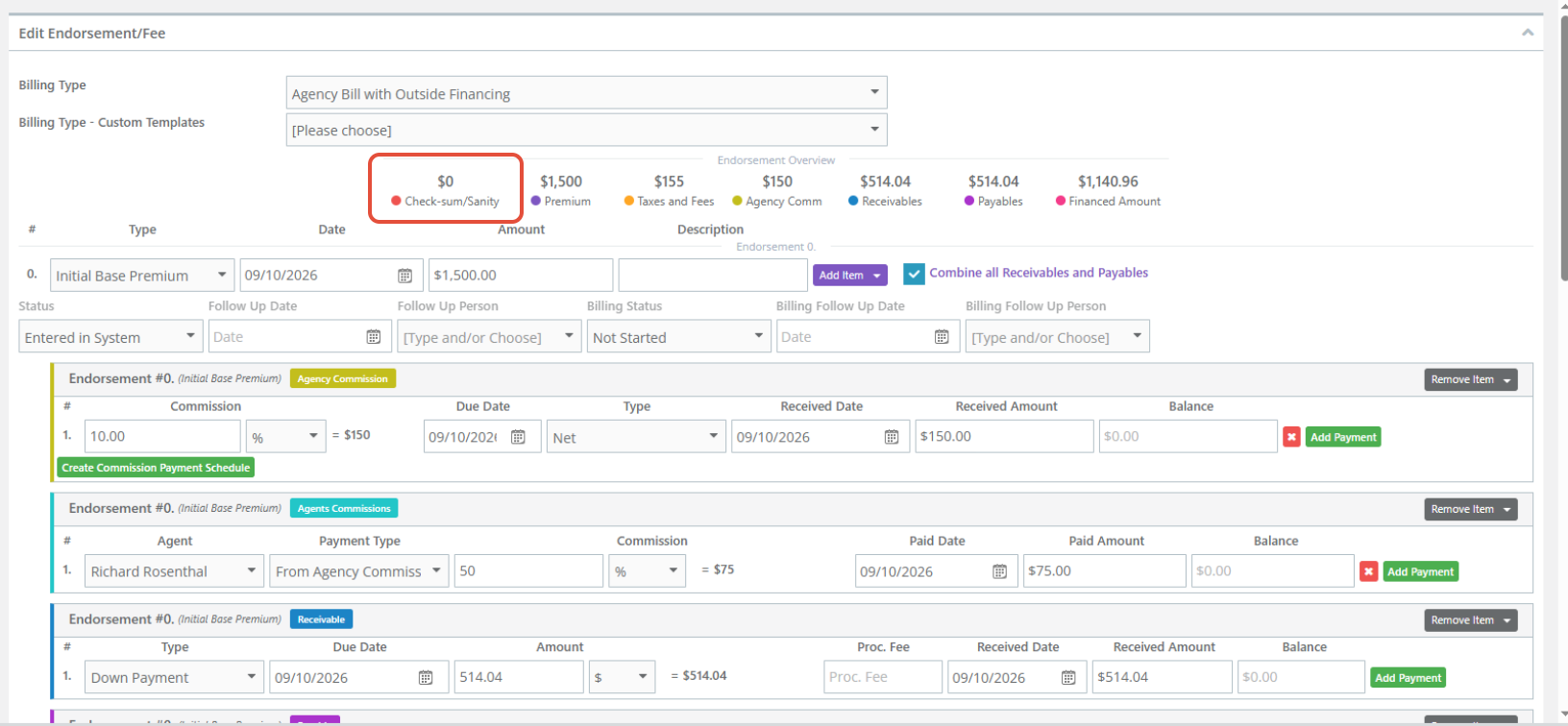
Repeat this verification for every policy included in the finance agreement.
Reconcile All Policies to the Finance Agreement
Once each individual policy has a Check-Sum/Sanity of 0, perform one final reconciliation against the actual premium finance agreement.
There are two totals to verify.
Total Down Payment
Add the Receivables across all policies:
Policy 1 Receivable + Policy 2 Receivable + Policy 3 Receivable = Total Down Payment on the Finance Agreement
For example, if the finance agreement requires a $2,800 total down payment, the Receivables for all policies combined must equal $2,800.
Total Amount Financed
Next, add the Amount Financed across all policies:
Policy 1 Amount Financed + Policy 2 Amount Financed + Policy 3 Amount Financed = Total Amount Financed on the Finance Agreement
The combined total should match the amount financed shown on the actual premium finance agreement.
Two Levels of Verification
A multi-policy finance agreement requires you to verify the accounting at two different levels.
Individual Policy Level
For each policy:
- Receivable reflects the allocated down payment.
- Payable corresponds with the Receivable, accounting for any Agency Fee associated with that policy.
- Amount Financed reflects the allocated financed amount.
- Commission remains unchanged.
- Check-Sum/Sanity 0
Finance Agreement Level
Across all policies:
- Combined Receivables equal the total down payment.
- Combined Amounts Financed equal the total amount financed.
Both levels need to be correct.
A Check-Sum/Sanity of 0 confirms that the individual transaction balances, while the combined totals confirm that the policies together reconcile to the actual finance agreement.
Best Practices
When allocating one premium finance agreement across multiple policies:
- Have the actual premium finance agreement available.
- Enter the premium, taxes, and fees for all policies before using the calculator.
- Include all applicable policies in the Premium Finance Breakdown Calculator.
- Enter the total down payment from the actual finance agreement.
- Record the calculator results before closing it because the results are not saved.
- Adjust the Receivable, Payable, and Amount Financed on each policy as necessary.
- Apply an Agency Fee only to the policy where the fee actually belongs.
- Do not change agency commission as part of the allocation.
- Confirm Check-Sum/Sanity 0 on every individual policy.
- Confirm that the combined Receivables equal the finance agreement's total down payment.
- Confirm that the combined Amounts Financed equal the finance agreement's total amount financed.
Summary
When one premium finance agreement covers multiple policies, think of it as one agreement that must be accounted for across several individual policy transactions.
Use the Premium Finance Breakdown Calculator to determine a logical proportional allocation. Enter the total down payment from the finance agreement, include all applicable policies, calculate the breakdown, and record each policy's Down Payment and Amount Financed before leaving the calculator.
Then adjust the individual policy transactions as necessary.
Finally, verify the accounting at both levels:
Each individual policy must have Check-Sum/Sanity 0.
And:
All policies combined must reconcile to the total down payment and total amount financed on the actual premium finance agreement.
The calculator helps determine the allocation, but the actual premium finance agreement is the final source of truth.
Was this article helpful?
That’s Great!
Thank you for your feedback
Sorry! We couldn't be helpful
Thank you for your feedback
Feedback sent
We appreciate your effort and will try to fix the article