When Momentum generates an Agency Bill with Outside Financing transaction, it initially assumes a 25% down payment. Your actual premium finance agreement may require a different amount. When this happens, use the finance agreement to correct the Receivable, Payable, and Amount Financed. After making your adjustments, always confirm that Check-sum/Sanity equals $0. Any amount in Checksum Sanity indicates that something in the transaction has been entered incorrectly.
Why Doesn't Momentum's Down Payment Match My Finance Agreement?
When you generate an Agency Bill with Outside Financing transaction, Momentum initially calculates the transaction using a 25% down payment.
Your premium finance company may require a different percentage or a specific down-payment amount.
For example, Momentum may initially calculate a $2,500 down payment while the actual finance agreement requires $2,800.
That does not necessarily mean Momentum generated the transaction incorrectly. The 25% calculation is the initial amount used when generating the transaction.
The actual premium finance agreement controls the final accounting.
Start with the Premium Finance Agreement
Before changing the transaction, have the actual premium finance agreement available.
Identify the:
- Total required down payment
- Amount financed
- Policies included in the agreement
- Per-policy down-payment amounts, when multiple policies are financed
- Any applicable Agency Fees
Your goal is not to make Momentum's original 25% calculation work.
Your goal is to make the transaction match the actual premium finance agreement.
Correcting a Single Financed Policy
If only one policy is included in the finance agreement, the Receivable should match the required down payment.
Once you change the Receivable, the corresponding Payable and Amount Financed must also be reviewed and adjusted.
Example
Suppose Momentum initially generates:
| Accounting Item | Momentum Generated |
|---|---|
| Receivable | $2,500 |
| Payable | $2,500 |
| Amount Financed | $7,500 |
The actual premium finance agreement requires a $2,800 down payment.
The down payment needs to increase by $300.
Assuming there is no Agency Fee, the corrected transaction would be:
| Accounting Item | Corrected Amount |
|---|---|
| Receivable | $2,800 |
| Payable | $2,800 |
| Amount Financed | $7,200 |
The Receivable and Payable increased by $300, so the Amount Financed decreased by $300.
The Amount Financed Must Also Be Adjusted
One of the most important parts of correcting a premium-financed transaction is remembering that changing the down payment also changes the Amount Financed.
The Amount Financed moves in the opposite direction by the same amount as the down-payment adjustment.
Increase the down payment → Decrease the Amount Financed by the same amount.
Decrease the down payment → Increase the Amount Financed by the same amount.
Example: Decreasing the Down Payment
Suppose Momentum generates:
- Receivable: $2,500
- Payable: $2,500
- Amount Financed: $7,500
The actual finance agreement requires only a $2,000 down payment.
The down payment decreases by $500, so the Amount Financed increases by $500:
- Corrected Receivable: $2,000
- Corrected Payable: $2,000
- Corrected Amount Financed: $8,000
What If Multiple Policies Are on the Same Finance Agreement?
When a single premium finance agreement covers multiple policies, Momentum needs the correct down-payment amount for each individual policy.
Do not place the entire down payment on one policy.
For example, if three policies are included in a finance agreement requiring a total down payment of $2,800:
Policy 1 Receivable + Policy 2 Receivable + Policy 3 Receivable = $2,800
The individual policy Receivables must add up to the total required down payment.
Determining the Per-Policy Breakdown
Use the per-policy breakdown provided by the premium finance company whenever it is available.
If the finance company does not provide the breakdown, use Momentum's Premium Finance Breakdown Calculator to determine the appropriate allocation.
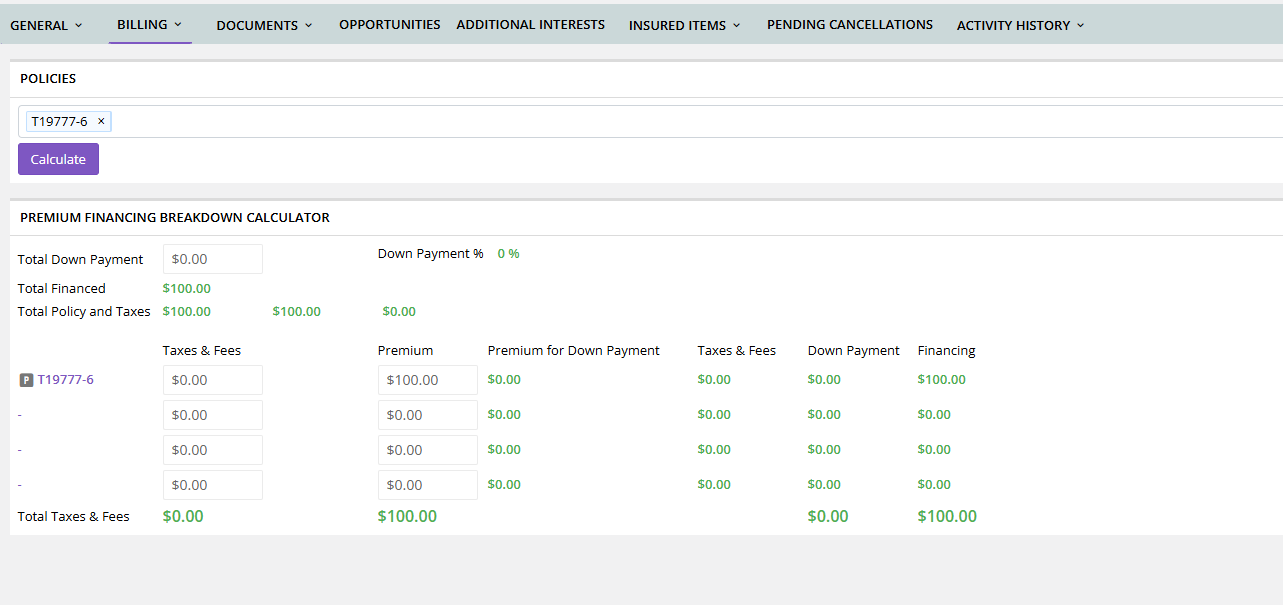
Once the allocation is determined, adjust each individual policy transaction to reflect its portion of the down payment.
Adjusting the Receivable and Payable
Once you know the correct down payment for the policy, adjust the Receivable to that amount.
Normally, the corresponding Payable should match the Receivable.
There is one important exception: an Agency Fee.
What If There Is an Agency Fee?
If an Agency Fee is included on the policy, the Receivable and Payable may legitimately be different.
For example:
| Accounting Item | Amount |
|---|---|
| Required Down Payment / Receivable | $1,200 |
| Agency Fee | $100 |
| Payable | $1,100 |
The agency collects $1,200, but $100 of that amount is an Agency Fee retained by the agency. Therefore, only $1,100 is reflected in the Payable.
Don't Automatically Spread an Agency Fee Across Every Policy
If multiple policies are included in the finance agreement, do not assume the Agency Fee applies equally to every policy.
If the Agency Fee belongs to only one policy, only that policy's Payable should reflect the fee adjustment.
Don't Reduce the Payable for Agency Commission
An Agency Fee and Agency Commission are not the same thing.
Do not reduce the Payable by the agency's commission when correcting a premium finance transaction.
Agency commission is accounted for through the Issue Payment process.
For additional information, see:
How Do I Pay an MGA or Carrier and Account for Agency Commission?
Always Check the Checksum Sanity
After adjusting the premium-finance transaction, review the Check-sum/Sanity.
Check-sum/Sanity must always equal $0.
If Checksum Sanity contains any amount other than zero, something entered in the transaction is incorrect.
This makes Checksum Sanity an important final verification when adjusting the Receivable, Payable, or Amount Financed.
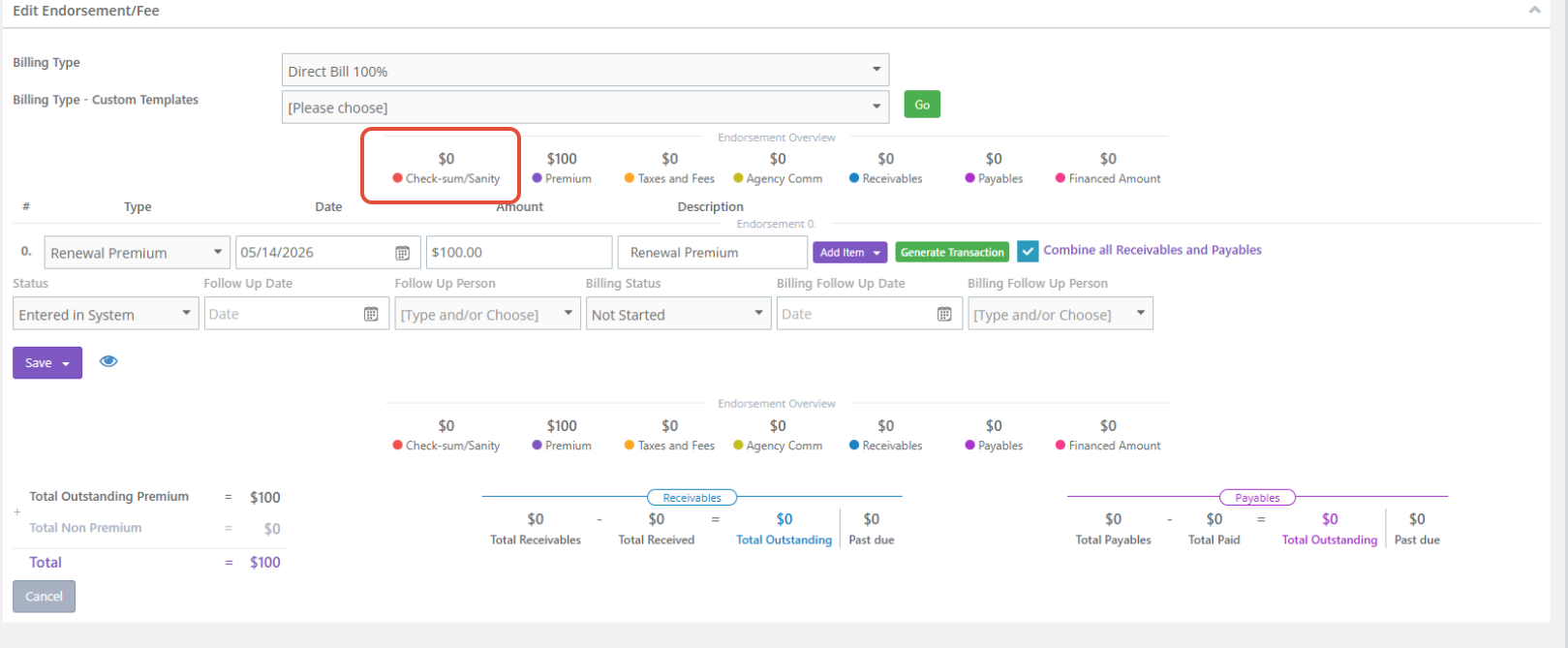
Do not consider the transaction complete until the Check-sum/Sanity returns to $0.
If it does not equal zero, review the amounts you entered before continuing.
Recommended Correction Process
When the down payment generated by Momentum does not match the premium finance agreement:
- Have the actual premium finance agreement available.
- Identify the total required down payment.
- If multiple policies are included, determine the down-payment amount for each individual policy.
- Adjust each policy's Receivable to its portion of the required down payment.
- Adjust the corresponding Payable.
- If an Agency Fee applies to that policy, account for the fee when determining the Payable.
- Adjust the Amount Financed by the same amount as the down-payment adjustment, but in the opposite direction.
- Confirm that the combined Receivables for all financed policies equal the total down payment required by the finance agreement.
- Compare the corrected transaction to the actual premium finance agreement.
- Confirm that Check-sum/Sanity = $0 before continuing.
Best Practices
When correcting an outside-financed transaction:
- Always work from the actual premium finance agreement.
- Do not assume Momentum's initial 25% down payment is the amount required by the finance company.
- When the down payment changes, remember to adjust the Amount Financed in the opposite direction.
- Use the finance company's per-policy breakdown when multiple policies are financed together.
- If no breakdown is provided, use Momentum's Premium Finance Breakdown Calculator.
- Account for an Agency Fee on the policy where the fee applies.
- Do not reduce the Payable for Agency Commission.
- Always verify that Check-sum/Sanity equals $0 after making your changes.
Summary
Momentum initially assumes a 25% down payment when generating an Agency Bill with Outside Financing transaction. The actual premium finance agreement, however, determines the amounts that should ultimately be entered.
Adjust the Receivable to match the required down payment, adjust the Payable as appropriate, and change the Amount Financed by the same amount in the opposite direction.
When multiple policies are included in one finance agreement, determine the correct down-payment allocation for each policy and make sure the combined Receivables equal the finance agreement's total required down payment.
Finally, always check Check-sum/Sanity.
Check-sum/Sanity must equal $0. If it doesn't, something in the transaction is incorrect and should be reviewed before continuing.
Was this article helpful?
That’s Great!
Thank you for your feedback
Sorry! We couldn't be helpful
Thank you for your feedback
Feedback sent
We appreciate your effort and will try to fix the article