When paying an MGA or carrier for an Agency Bill transaction, do not manually reduce the Payable by your agency commission. Momentum accounts for the commission when the Issue Payment is created. Before creating the payment, decide whether the policy will be paid individually or included with other policies in a single MGA or carrier payment.
Understanding the Payable and Issue Payment
When Momentum generates an Agency Bill transaction, the Payable should not be manually reduced by your agency commission.
The Payable represents the amount generated from the premium transaction. The commission is accounted for when the Issue Payment is created.
A simple way to remember this is:
Payable = Amount generated from the transaction
Issue Payment = Where agency commission is accounted for and the net payment is determined
Example: $10,000 Premium with 15% Commission
Suppose the transaction contains:
| Accounting Item | Amount |
|---|---|
| Premium | $10,000 |
| Receivable | $10,000 |
| Payable | $10,000 |
| Agency Commission | $1,500 |
| Net Amount Remitted | $8,500 |
Even though your agency ultimately remits $8,500 to the MGA or carrier, the Payable should remain $10,000.
Do not manually change the Payable to $8,500.
When the Issue Payment is created, Momentum accounts for the $1,500 agency commission and determines the $8,500 net payment.
Decide How You Want to Pay the MGA or Carrier
Before creating the Issue Payment, decide whether you want to:
- Pay the MGA or carrier for this individual policy, or
- Combine several policy Payables into one payment.
This decision is important because once an individual Issue Payment has been created for a Payable, that same Payable cannot also be included in another Issue Payment.
Option 1: Pay an Individual Policy
If you are paying the MGA or carrier for a single policy, Momentum can create the insured invoice and Issue Payment directly from the policy transaction.
When saving the transaction, select:
Save And Create Invoice for Receivables and Issue Payment for Payables and Net Agency Commissions
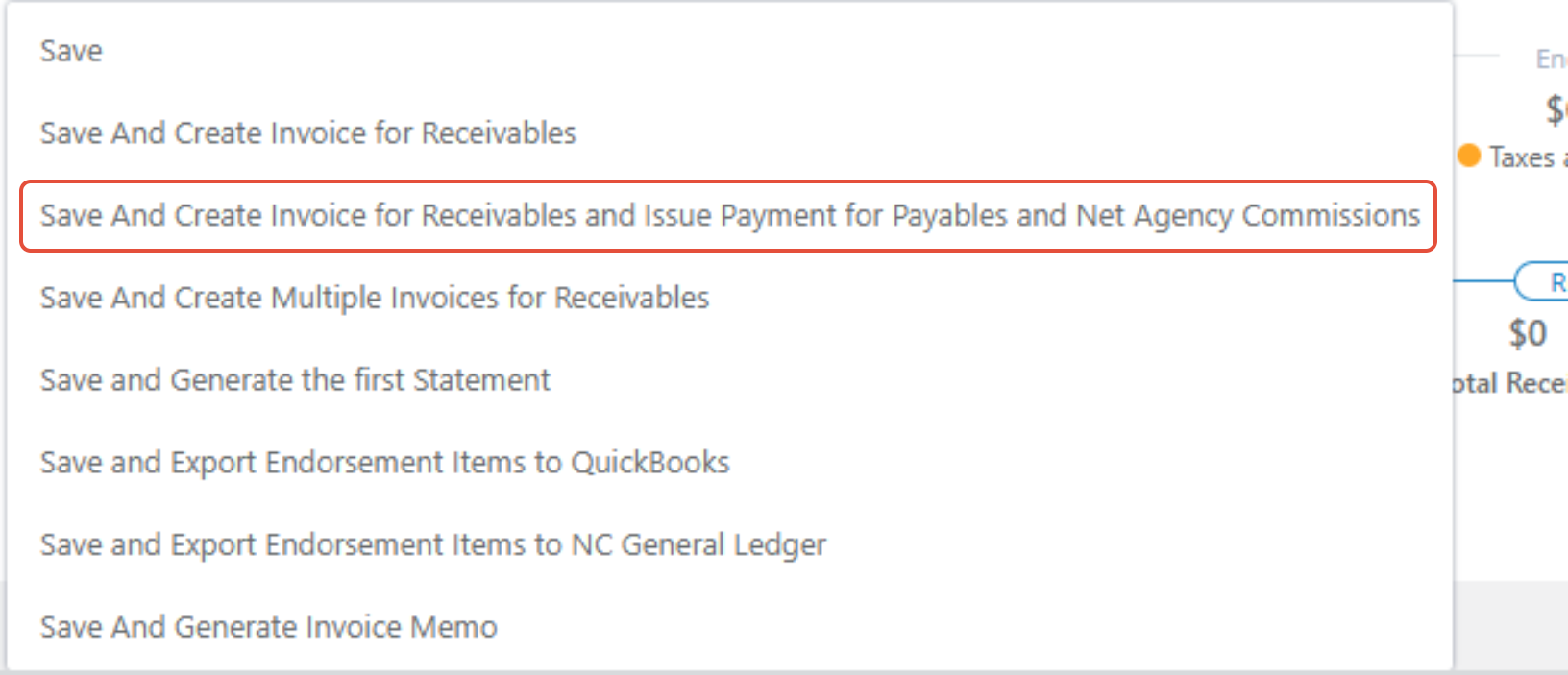
Momentum will create the insured invoice, create the Issue Payment, and account for the agency commission when determining the net amount to remit.
For complete step-by-step instructions on creating and completing the payment, see:
Issuing a Payment to a Carrier or MGA
This option is appropriate when the policy will be paid individually and does not need to be included with other policies in a master MGA or carrier payment.
Then I’d make the transition into the next section:
Option 2: Combine Multiple Policies into One MGA or Carrier Payment
Many agencies do not send a separate payment for every policy. Instead, they may send one payment to an MGA or carrier covering several policies.
If you intend to batch multiple Payables together, do not create the individual Issue Payment when generating each policy transaction.
For each transaction, select:
Save And Create Invoice for Receivables
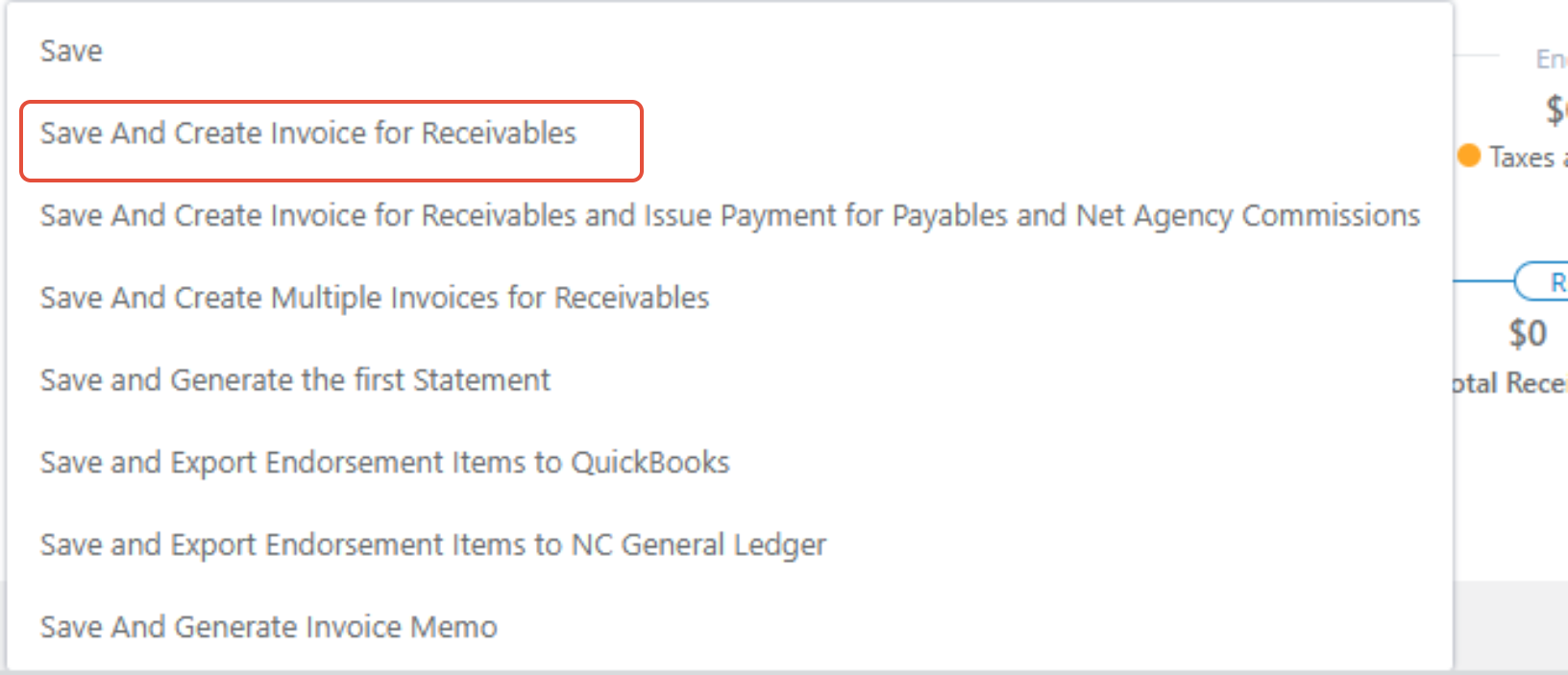
This creates the insured invoice while leaving the Payable available to be included in a master Issue Payment later.
Creating the Master Issue Payment
Once the applicable policy transactions are ready:
- Go to the applicable MGA or carrier.
- Select Issue Payments tab
- Select "Add New"
- Select all of the policies you want to include
- Select the applicable available Payables.
- Select the applicable net commission amounts.
- If a payable or commission is not being displayed then it was not assigned at the policy level or an issue payment may exist.
- Complete the Issue Payment.
This allows multiple policy Payables to be included in one master payment rather than creating a separate payment for every policy.
Important: Don't Create the Issue Payment Twice
A Payable cannot be included in multiple Issue Payments.
If you already created an individual Issue Payment when generating the policy transaction, that Payable will not be available to add to another master MGA or carrier payment.
For example, if you have five policies that you want to include in one MGA payment, do not create five individual Issue Payments first.
Instead:
Policy 1 → Create Invoice Only
Policy 2 → Create Invoice Only
Policy 3 → Create Invoice Only
Policy 4 → Create Invoice Only
Policy 5 → Create Invoice Only
Then create:
One Master Issue Payment → Include Payables from Policies 1–5
Why Isn't a Policy Available for My Master Payment?
If a policy is not available when creating a master Issue Payment, first determine whether an individual Issue Payment has already been created for that policy's Payable.
If it has, the same Payable cannot be added to another Issue Payment.
If no Issue Payment has been created and the Payable exists but the policy still does not appear, verify the MGA and Carrier assignments on the policy.
An incorrect policy-level MGA or Carrier assignment can prevent an existing Payable from appearing under the expected Issue Payment.
Best Practice
Decide how your agency intends to pay the MGA or carrier before creating the Issue Payment.
Individual Policy Payment
Use:
Save And Create Invoice for Receivables and Issue Payment for Payables and Net Agency Commissions
Momentum creates both the insured invoice and the individual Issue Payment.
Batch MGA or Carrier Payment
Use:
Save And Create Invoice for Receivables
This creates the insured invoice but leaves the Payable available.
When all applicable transactions are ready, create one master Issue Payment at the MGA or carrier level and include the appropriate Payables.
Remember: Don't Reduce the Payable for Commission
One of the most important accounting rules in this workflow is:
Never manually reduce the Payable simply because your agency earns commission.
If the premium is $10,000 and your agency earns $1,500 in commission, the Payable should not be manually changed to $8,500.
Momentum accounts for the commission through the Issue Payment process.
Summary
When paying an MGA or carrier in Momentum AMS, leave the generated Payable intact. Agency commission is accounted for when the Issue Payment is created.
If you are paying one policy individually, you can create the invoice and Issue Payment together.
If you want to combine several policies into one MGA or carrier payment, create the insured invoices without creating individual Issue Payments. Then create a master Issue Payment containing the applicable Payables.
The key rules are:
Don't manually net commission from the Payable.
Decide whether you're paying individually or in a batch before creating the Issue Payment.
Once a Payable has been used in an Issue Payment, it cannot also be included in another Issue Payment.
Was this article helpful?
That’s Great!
Thank you for your feedback
Sorry! We couldn't be helpful
Thank you for your feedback
Feedback sent
We appreciate your effort and will try to fix the article