If a Payable exists on a transaction but the policy does not appear under Issue Payments, don't immediately change or regenerate the accounting. First, verify the MGA and Carrier assigned to the policy. Issue Payments uses the policy-level MGA/Carrier assignment to determine which policies and Payables are available for payment.
Why Isn't the Payable Showing?
When you use Issue Payments, Momentum uses the MGA and Carrier assignments on the policy to determine which policies and Payables should be available.
This means a Payable can exist correctly on the transaction but still not appear where you expect under Issue Payments if the policy is assigned to the wrong MGA or Carrier.
Before making changes to the accounting, check the policy itself.
Step 1: Confirm That the Payable Exists
First, review the policy transaction and confirm that the expected Payable has already been generated.
If the Payable exists on the transaction but you cannot find the policy under Issue Payments, you generally do not need to delete or regenerate it.
Instead, move on to checking the policy's MGA and Carrier assignments.
Step 2: Review the Policy's MGA and Carrier
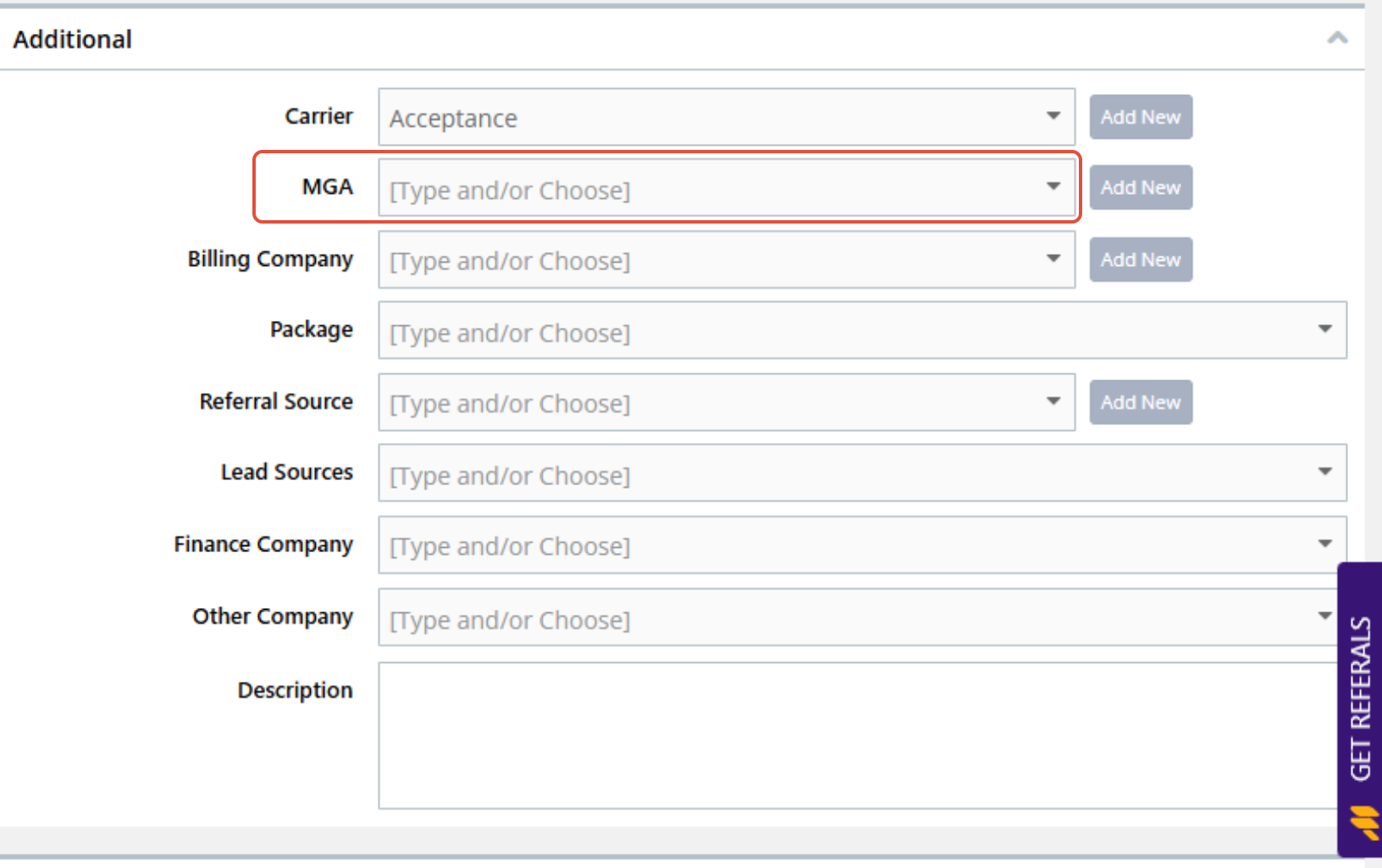
Open the policy and review the MGA and Carrier assigned to it.
Confirm that:
- The correct MGA is assigned.
- The correct Carrier is assigned.
- The assignments match the carrier or MGA you are selecting when using Issue Payments.
If either assignment is incorrect, update it and save the policy.
Step 3: Return to Issue Payments
After correcting the policy:
- Return to Issue Payments.
- Select the appropriate MGA/Carrier.
- Locate the policy and existing Payable.
Once the policy-level assignment is corrected, the policy and its existing Payable should be available under the appropriate MGA/Carrier.
[Insert Screenshot – Issue Payments MGA/Carrier Selection]
Do I Need to Regenerate the Transaction?
No, not when the Payable already exists and the issue is an incorrect policy-level MGA or Carrier assignment.
Correcting the policy assignment allows Momentum to associate the existing policy and Payable with the appropriate selection under Issue Payments.
There is no need to:
- Delete the Payable
- Remove the transaction
- Change the billing type
- Regenerate the accounting
- Recreate the Payable
Unnecessarily changing generated accounting can create additional accounting problems when the original transaction was already correct.
Best Practice
When troubleshooting a missing policy under Issue Payments, use this distinction:
Payable exists + Policy doesn't appear under Issue Payments = Check the MGA/Carrier assignment on the policy first.
Do not start by changing the transaction.
If the MGA or Carrier assignment is incorrect, correct it at the policy level, save the policy, and return to Issue Payments.
The existing transaction and Payable can remain in place.
What If the Payable Doesn't Exist?
This article applies when the Payable already exists but cannot be found under Issue Payments.
If the transaction does not contain a Payable at all, the issue is different. In that situation, review the transaction and accounting workflow to determine why the Payable was not generated.
Likewise, use the appropriate accounting workflow if:
- The Receivable or Payable amount is incorrect.
- The wrong billing type was selected.
- You need to determine the amount to remit after commission.
- The issue involves allocating an outside premium finance agreement.
Summary
If a policy or Payable is missing from Issue Payments, don't assume the accounting needs to be rebuilt.
First confirm that the Payable exists. If it does, check the MGA and Carrier assignments on the policy.
Correct an incorrect assignment at the policy level, save the policy, and return to Issue Payments.
If the Payable already exists, check the policy's MGA and Carrier before touching the accounting.
Was this article helpful?
That’s Great!
Thank you for your feedback
Sorry! We couldn't be helpful
Thank you for your feedback
Feedback sent
We appreciate your effort and will try to fix the article