Momentum AMS integrates with Certificial, a Certificate of Insurance (COI) management and issuance platform that helps agencies automate certificate requests, share policy information, and keep certificate holders informed of policy changes.
Through this integration, agencies can synchronize commercial client and policy information from Momentum AMS to Certificial, reducing manual data entry and supporting automated certificate management.
This article explains the benefits of the integration and how to enable Certificial within Momentum AMS.
What Is Certificial?
Certificial is a Certificate of Insurance management platform designed to simplify the issuance, distribution, and ongoing management of insurance certificates.
When connected to Momentum AMS, Certificial can use synchronized policy information to help agencies respond to certificate requests and provide certificate holders with updated insurance information.
Benefits of the Certificial Integration
- Real-Time Policy Information: Share policy information between Momentum AMS, Certificial, agency clients, and certificate holders.
- Automated Certificate Requests: Certificial's Auto-Response feature can automatically respond to qualifying Certificate of Insurance requests.
- Automated Renewals: Reduce the need to manually reissue and distribute certificates when policies renew.
- Policy Change Notifications: Keep certificate holders informed of changes to client policies, including coverage limits, effective dates, and carrier ratings.
- Reduced Manual Processing: Synchronize commercial insured and policy information instead of manually entering the same information into both systems.
How to Enable the Certificial Integration
Step 1: Create a Certificial Account
Before enabling the integration, your agency must have a Certificial account.
Visit Certificial to set up your account.
Step 2: Log In to Momentum AMS
Log in to your Momentum AMS account.
Step 3: Access Data Imports and Exports
- From the left navigation menu, expand Miscellaneous.
- Select Data Imports and Export.
Step 4: Select Certificial API Data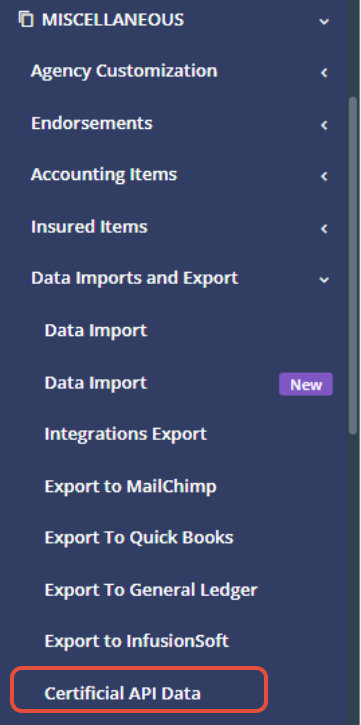
Step 5: Enable the Integration
Click Enable Certificial Integration.
This initiates the integration setup process between Momentum AMS and Certificial.
Step 6: Wait for Confirmation
After enabling the integration, Certificial will handle the remaining setup process for your agency.
The Certificial team may contact your agency if additional information is needed.
Once the data synchronization begins, Certificial will send a confirmation email.
Enabling the Certificial integration in Momentum AMS initiates the setup process. The integration may not begin synchronizing data immediately.
Certificial completes the setup and sends a confirmation email once the data flow begins.
What Information Is Synchronized?
According to Certificial, the integration provides a complete data synchronization of the following information from Momentum AMS:
- Active Commercial Clients: Commercial insured records associated with your agency.
- Policy Details: Insurance policy information associated with those clients.
- Named Insured Information: Named insured information associated with the policies.
- Certificate Holder Information: Certificate holder information associated with the agency's commercial accounts.
This information supports Certificial's certificate issuance and management workflows.
Frequently Asked Questions
Do I need a Certificial account before enabling the integration?
Yes. Agencies should first establish a Certificial account before enabling the integration in Momentum AMS.
Does enabling the integration immediately synchronize my data?
Not necessarily. Enabling the integration starts the setup process. Certificial handles the remaining setup and sends a confirmation email when the data flow begins.
Does the integration include personal lines policies?
The integration information provided by Certificial specifically identifies active commercial clients and their associated policy information.
Can Certificial automatically respond to certificate requests?
Yes. Certificial offers an Auto-Response feature that can automate qualifying Certificate of Insurance requests when configured.
Can certificate holders receive notifications about policy changes?
Yes. Certificial supports notifications regarding policy changes, including limits, effective dates, and carrier ratings.
For questions regarding Certificial account setup, integration activation, or Certificial's certificate management features, contact the Certificial team using the resources above.
Was this article helpful?
That’s Great!
Thank you for your feedback
Sorry! We couldn't be helpful
Thank you for your feedback
Feedback sent
We appreciate your effort and will try to fix the article