If you receive money from an insured before the final premium is known, you do not need to create an estimated transaction, Receivable, or invoice just to record the payment. Record the money as a Credit Payment. The credit can remain available until the actual premium transaction and invoice are created, and then be applied to the insured's invoice.
When Should I Use a Credit Payment?
Sometimes an insured pays your agency before you know exactly what the final premium will be.
For example:
- You collect a deposit while coverage is still being finalized.
- You know approximately how much the insured will owe but don't have the final premium.
- The insured sends money before the premium transaction has been generated.
- You need to hold a payment until the appropriate invoice can be created.
You do not need to create an estimated premium transaction or invoice simply to have somewhere to record the payment.
Instead, record the money as a Credit Payment.
Money received + No invoice = Credit Payment
Example
Suppose you estimate that an insured will need to pay approximately $1,000, and the insured gives your agency $1,000 before the final premium has been determined.
At this point:
- The agency has actually received $1,000.
- The final premium is still unknown.
- There is no actual Receivable to invoice yet.
Rather than creating an estimated $1,000 premium transaction, record the $1,000 as a Credit Payment.
The money can remain available until you know what the insured actually owes.
How to Record the Credit Payment
Step 1: Open the Invoices / Receipts List
Go to the Invoices / Receipts List.
At the upper-right of the page, select Actions.
Step 2: Select Take Payment (with A/R)
From the Actions menu, select:
Take Payment (with A/R)

Using Take Payment (with A/R) allows you to record the insured's payment without first creating an invoice.
Step 3: Enter the Payment
Enter the applicable payment information and complete the payment.
Because there is no invoice to apply the payment to yet, the money can remain as an available Credit Payment.
You do not need to associate the payment with an estimated premium transaction simply because the agency has received the money.
Where Can I Find the Credit?
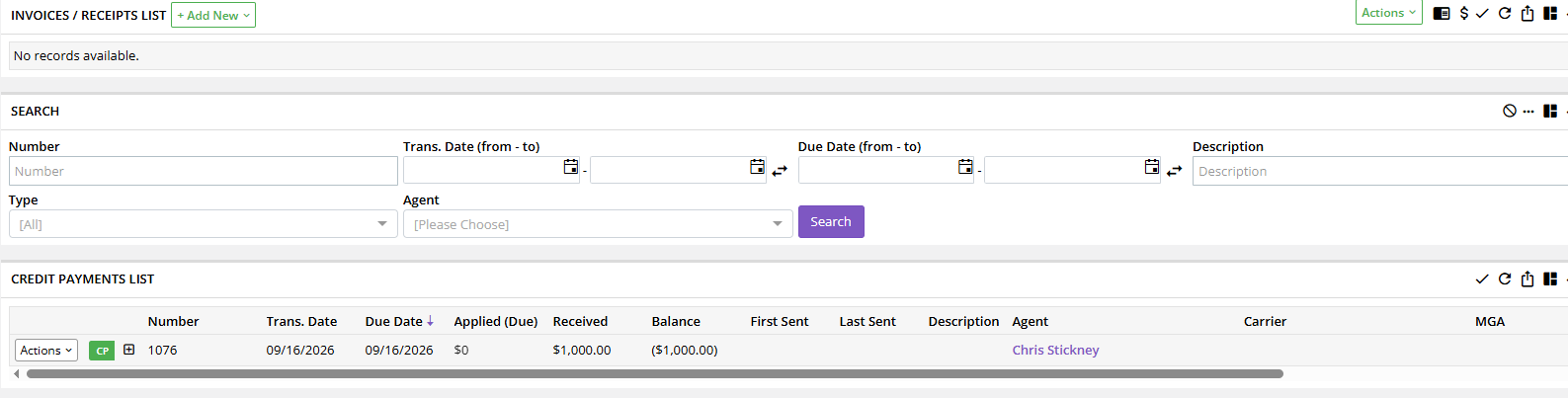
The payment will appear in the Credit Payments List within the Invoices area.
The credit remains available until there is an invoice to which it can be applied.
What Do I Do Once the Final Premium Is Known?
Once you have the actual premium, create the accounting based on the real transaction.
Step 1: Enter the Actual Premium Transaction
Enter the appropriate premium transaction using the correct premium and billing information.
Generate the transaction normally.
Do not base the transaction on the amount of the Credit Payment. The transaction should reflect the actual premium.
Step 2: Create the Invoice
Create the insured invoice for the generated Receivable.
At this point, you now have an actual invoice to which the previously received money can be applied.
Step 3: Apply the Existing Credit
From the invoice, select:
Actions → Take Payment → Apply Existing Credit
Select the available Credit Payment and apply it to the invoice.
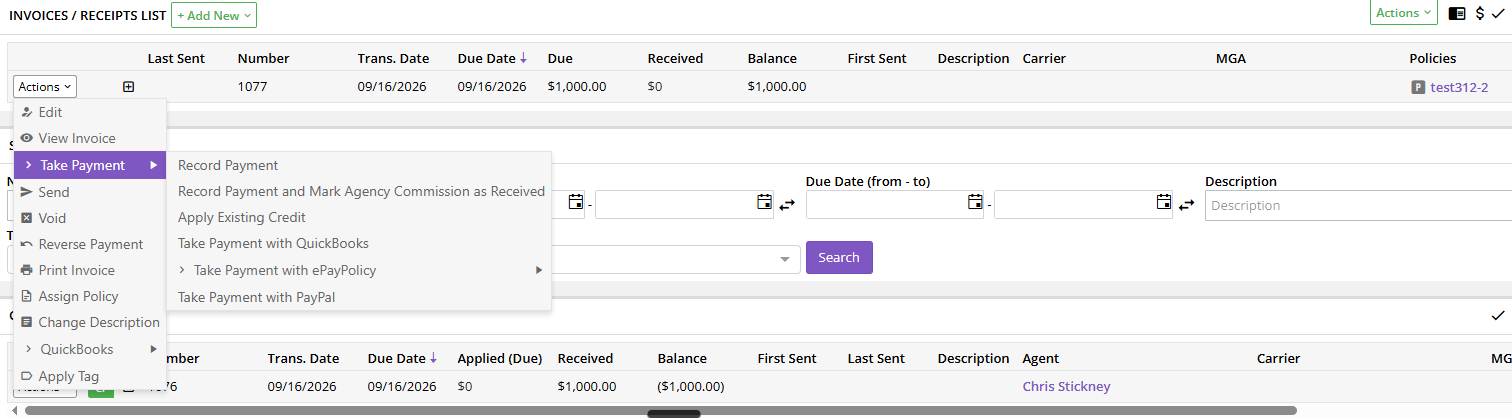
The previously received money is now applied toward the insured's actual invoice.
What If the Final Premium Is Different from the Credit?
The Credit Payment does not determine the premium.
The final transaction should always reflect the actual premium, regardless of how much was collected in advance.
For example, suppose the agency collected a $1,000 Credit Payment.
Once the premium is finalized, the insured's invoice is $1,200.
Apply the $1,000 existing credit to the invoice. The credit is used toward the amount the insured actually owes.
The important point is that you did not need to create a $1,000 premium transaction simply because that was the amount originally collected.
Don't Create Accounting Just to Give the Payment Somewhere to Go
This is the most important principle in this workflow.
Don't create a transaction, Receivable, or invoice solely because you received an advance payment.
Doing so can create accounting based on an estimated amount rather than what actually occurred.
Instead:
Receive the money → Record a Credit Payment → Wait for the actual premium → Generate the real transaction → Create the invoice → Apply Existing Credit
This keeps the accounting tied to the actual transaction.
Other Ways a Credit May Appear
An advance payment is not the only reason an insured may have a credit in Momentum.
A credit can also result from money that is due back to the insured, such as a refund or return-premium transaction.
In either situation, the Credit Payments List represents value that is available to the insured.
The important distinction is understanding how the credit was created and what needs to happen to it next.
Credit Payment vs. Pass-Through Payment
A Credit Payment is conceptually similar to a Pass-Through Payment, but the money is ultimately being applied differently.
| Payment Type | Used For |
|---|---|
| Credit Payment | Money that can later be applied to an insured's invoice |
| Pass-Through Payment | Money received that can later be applied toward a payment to a carrier or MGA |
For an insured payment received before an invoice exists, use the Credit Payment workflow.
What Billing Type Should I Use Later?
When the final premium is known, enter the actual transaction using the billing type appropriate for that transaction.
Do not assume the billing arrangement has to be the same as an earlier transaction on the policy.
For example, an earlier transaction may have involved premium financing, while a later transaction may simply be handled as Agency Bill.
The billing type should reflect how that particular transaction is actually being handled.
Best Practices
When you receive an insured's payment before the final premium is known:
- Record the money as a Credit Payment.
- Do not create an estimated premium transaction simply to record the payment.
- Do not create an unnecessary Receivable or invoice.
- Allow the credit to remain available until the actual premium is known.
- Generate the transaction using the actual premium.
- Create the appropriate insured invoice.
- Use Actions → Take Payment → Apply Existing Credit to apply the previously received money.
- Use the billing type appropriate for the actual transaction.
Summary
If your agency receives money from an insured before the final premium is known, there is no need to create estimated accounting just to record the payment.
Record the money as a Credit Payment and allow it to remain available until the actual premium transaction and invoice are created.
Once the invoice exists:
Actions → Take Payment → Apply Existing Credit
The easiest way to remember the workflow is:
Money received + No invoice = Credit Payment
Then:
Invoice created + Credit available = Apply Existing Credit
Was this article helpful?
That’s Great!
Thank you for your feedback
Sorry! We couldn't be helpful
Thank you for your feedback
Feedback sent
We appreciate your effort and will try to fix the article