We are excited to announce that the Momentum Automation Center (MAC) has transitioned to a new, streamlined billing system. This update allows you to easily view, select, and manage your own subscription plans directly inside the platform. Here is everything you need to know about navigating the new portal and understanding your options.
How to Access Your Subscription
You can now upgrade or modify your plan right inside the Automation Center. To get started, navigate to the top right corner of the Automation Center and click the Subscription or Upgrade Plan menu.
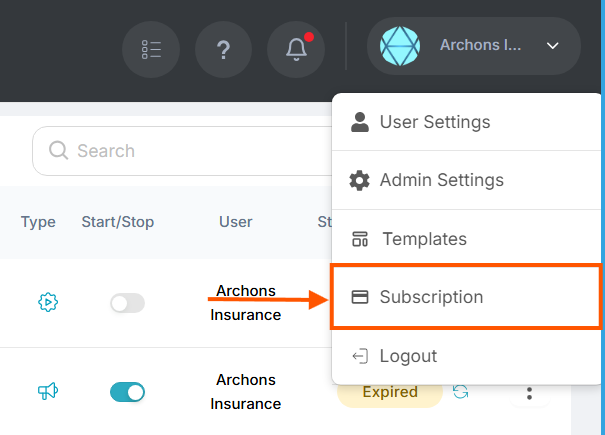
Note: If you do not see the Subscription or Upgrade Plan menu option, you are either not logged in as a Super Admin, or you are not the primary user who initially created the account. Please log in with the primary account to manage billing.
Understanding the Plan Levels
Whether you need basic automation or a full-scale CRM, we have structured our plans to fit your agency's growth. Click on a plan below to learn more about what is included.
Managing Your Team's Access
Because our base paid plans include up to 5 users, you must manually assign which of your team members consume those seats. If a team member logs in and sees a restricted screen, it means they haven't been added to your active plan yet.
- Navigate to Admin Settings > User Management.
- To give a user access, click Add to Plan next to their name.
- If you need to swap a user out to free up one of your 5 seats, simply click Remove from Plan on the old user, and assign the seat to the new one.
Migration Notes & Troubleshooting
If you are a long-time user, our team is currently manually migrating your legacy billing to this new system. You may notice your invoices look slightly different moving forward (for example, what was once called "Fusion Professional" will now cleanly display as "MAC Level 1").
Because we are actively migrating older accounts to this new billing infrastructure, you might occasionally encounter a sign-up error if your account hasn't fully synced. If you experience any issues upgrading your plan, please contact our support team immediately and we will ensure your account gets updated!
Was this article helpful?
That’s Great!
Thank you for your feedback
Sorry! We couldn't be helpful
Thank you for your feedback
Feedback sent
We appreciate your effort and will try to fix the article