Before transactions can be synchronized from Momentum AMS to QuickBooks, your QuickBooks accounts must be mapped to the appropriate accounting activity in Momentum.
The QuickBooks integration is designed to transfer accounting activity recorded in Momentum into QuickBooks through journal entries. This helps eliminate duplicate entry while allowing your accountant or bookkeeper to reconcile QuickBooks against the accounting records maintained in Momentum AMS.
Before You Begin
Before configuring your mapping, make sure your QuickBooks Chart of Accounts contains the accounts your agency intends to use for insurance accounting.
Depending on your agency's accounting practices, these may include accounts such as:
- Accounts Receivable – Agency Bill
- Premium Payable
- Undeposited Funds
- Agency Bill Commission Income
- Direct Bill Commission Receivable
- Direct Bill Commission Income
- Finance Company Receivable
- Agency Fee Income, when applicable
Connect Momentum AMS to QuickBooks
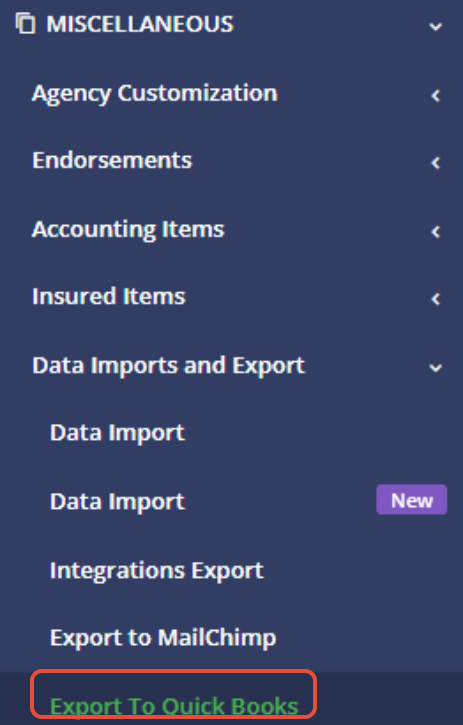
- In Momentum AMS, open Miscellaneous.
- Select Data Import/Export.
- Open the Export to QuickBooks section.
- Authenticate your QuickBooks account if it has not already been connected.
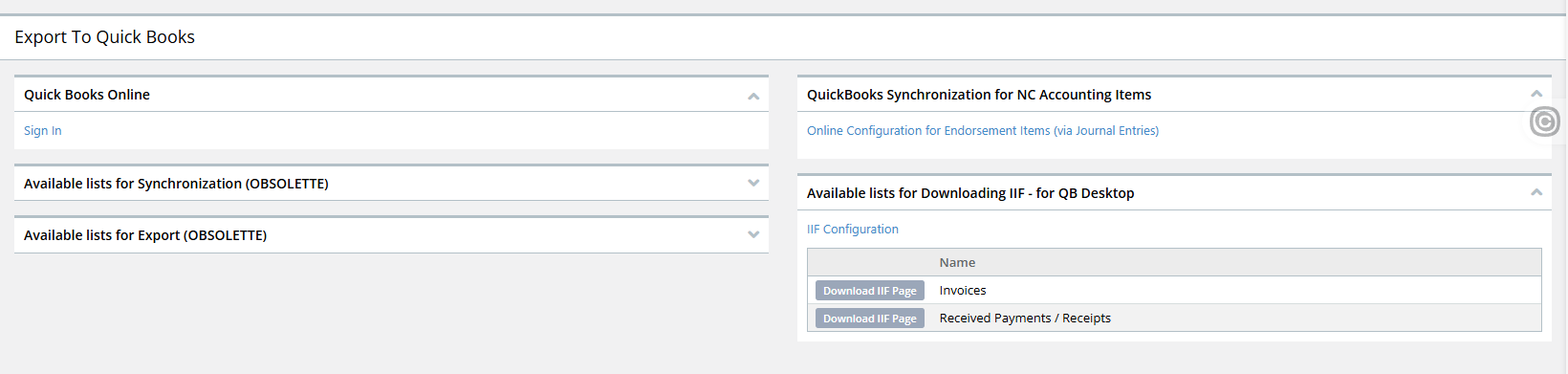
- Confirm that the correct QuickBooks company is displayed.
- Open the Mapping section.
Understanding Agency Bill Mapping
Agency Bill mapping follows the accounting cycle of an Agency Bill transaction. Momentum provides mapping for the accounts affected as the transaction moves through its lifecycle.
The three primary stages are:
- The premium is booked – a receivable and payable are created.
- Payment is received – the payment is recorded and the receivable is reduced.
- Payment is made to the carrier or MGA – the payable is reduced when the funds are disbursed.
Premium Mapping
When an Agency Bill premium is booked, the agency generally needs to account for:
- The amount owed by the insured or other payer.
- The amount ultimately payable to the carrier, MGA, or other company.
A common configuration is to map these to dedicated insurance-related Accounts Receivable and Accounts Payable accounts, such as:
- Accounts Receivable – Agency Bill
- Premium Payable
Using dedicated subaccounts can make it easier to distinguish insurance premium activity from other receivables and payables maintained in QuickBooks.
When Payment Is Received
When the agency receives payment, the mapping should reflect the receipt of funds and reduce the corresponding Accounts Receivable balance.
Depending on the agency's QuickBooks workflow, received funds may be mapped to an account such as Undeposited Funds before being included in the appropriate bank deposit.
When Premium Is Paid to the Company
When the agency sends the premium to the carrier or MGA, the transaction reduces the amount recorded as payable.
The mapping allows Momentum to create the corresponding journal-entry activity in QuickBooks when the transaction is synchronized.
Mapping Taxes and Policy Fees
Momentum allows different types of Agency Bill line items to be mapped separately. These can include:
- Premium
- Taxes
- Policy fees
- Agency fees
Taxes and policy fees may use the same general receivable and payable accounts as premium, or your agency may choose to maintain separate accounts for reporting purposes.
More specific mappings can also be created when your agency needs to track a particular transaction type separately.
Mapping Agency Fees
Agency fees differ from premium, taxes, and carrier fees because the agency may retain the fee as income rather than forwarding it to a carrier or MGA.
For this reason, the agency fee may be mapped to an income account such as Agency Fee Income.
The receivable side of the transaction is still recorded because the fee must be collected from the customer. However, there may be no corresponding company payable because the fee belongs to the agency.
Mapping Agency Bill Commission Income
When an Agency Bill transaction allows the agency to retain its commission before remitting premium, the amount payable to the company must be reduced by the agency's commission.
The commission portion can then be mapped to the appropriate Agency Bill Commission Income account.
This allows QuickBooks to reflect both the agency's liability to the company and the commission income retained by the agency.
Direct Bill Commission Mapping
Momentum also provides mapping options for Direct Bill commissions.
If your agency chooses to synchronize Direct Bill commission activity, you may use accounts such as:
- Direct Bill Commission Receivable
- Direct Bill Commission Income
- Undeposited Funds or the appropriate payment account
When the commission is initially recorded, the commission receivable and income can be recognized. When the commission payment is received, the receivable is reduced.
Premium Finance Mapping
Premium-financed transactions may require additional mapping because the finance company may be responsible for sending funds directly to the carrier or MGA.
Depending on the financing arrangement, your agency may need accounts such as:
- Finance Company Receivable
- Premium Payable
- Undeposited Funds or another appropriate payment account
The exact mapping depends on whether funds are received by the agency or sent directly between the premium finance company and the carrier or MGA.
Agent Commission Mapping
Momentum also provides mapping options for producer or agent commissions.
If your agency chooses to synchronize these transactions, typical accounts may include:
- Commission Expense
- Commission Payable
However, some agencies choose to record producer commissions in QuickBooks periodically in aggregate rather than synchronizing individual commission activity for every policy transaction.
Save Your Mapping
After completing or changing your QuickBooks mapping:
- Review each mapped account carefully.
- Confirm that the appropriate QuickBooks account is selected for each transaction type.
- Click Save.
Test Before Enabling Automatic Synchronization
QuickBooks synchronization can be performed manually while your agency verifies its mapping and accounting workflow.
Before enabling any automatic synchronization, test the configuration with actual transactions and confirm that the resulting QuickBooks journal entries are posting to the intended accounts.
Your agency should be comfortable with the complete workflow—including how transactions are synchronized, corrected, reversed, and reconciled—before relying on automatic synchronization.
Was this article helpful?
That’s Great!
Thank you for your feedback
Sorry! We couldn't be helpful
Thank you for your feedback
Feedback sent
We appreciate your effort and will try to fix the article