When a cancellation, endorsement, or correction results in return premium, do not edit the original generated transaction. Create a new endorsement that represents the change. For a normal return-premium transaction, Momentum generates the accounting in reverse, including a negative Receivable, negative Payable, and return commission when applicable. If the policy is premium financed, first determine where the return premium is actually going and process the accounting based on the actual movement of the money.
Don't Change the Original Transaction
When a policy is cancelled or changed after the original transaction has been generated, don't go back and modify that original transaction to reflect the new premium.
Instead, create a new endorsement representing what changed.
Use:
- Positive Endorsement for additional premium
- Negative Endorsement for return or reduced premium
- Non-Premium-Bearing Endorsement for a commission correction when the premium itself is not changing
This preserves the original accounting and creates a clear transaction history showing what occurred.
Create adjustments. Don't rewrite the original transaction.
This is particularly important when invoices or payments have already been created against the original transaction.
Processing a Normal Return Premium
If a cancellation or policy change results in return premium, create a negative endorsement for the amount being returned.
Generate the transaction as you normally would.
Momentum will create the accounting in reverse of the original premium transaction, including the applicable:
- Negative Receivable
- Negative Payable
- Return Commission
The negative accounting represents money moving back through the transaction.
Returning Premium to the Insured
Suppose a cancellation results in $110 of return premium, and $10 of that amount represents commission the agency previously earned.
The insured is still entitled to the full:
$110 return premium
When the negative Receivable is invoiced, Momentum creates a credit invoice representing the amount owed back to the insured.
On the MGA or carrier side, however, the return commission affects the amount coming back to the agency.
Example
| Item | Amount |
|---|---|
| Return Premium | $110 |
| Return Commission | $10 |
| Amount Returned by MGA/Carrier to Agency | $100 |
| Amount Owed Back to Insured | $110 |
The MGA or carrier returns $100 to the agency because the agency is responsible for returning the $10 commission it previously earned.
The agency then owes the insured the full $110.
That difference is expected.
Do not change the Payable simply to make the amount received from the MGA or carrier equal the amount being refunded to the insured.
The return commission accounts for the difference.
Premium-Financed Policies Require an Additional Step
Return premium on a premium-financed policy may need to be handled differently.
Before processing the accounting, determine:
Where is the return premium actually going?
In many premium-finance situations, the MGA or carrier sends the return premium directly to the premium finance company.
When that happens:
MGA/Carrier → Premium Finance Company
The return premium never passes through the agency.
The agency should not create accounting that makes it appear that it received or refunded money that never passed through its accounts.
If the Return Premium Goes Directly to the Finance Company
First create the negative endorsement and generate the transaction.
Momentum will initially generate the corresponding negative accounting.
If the MGA or carrier is sending the return premium directly to the premium finance company:
- Remove the generated Receivable.
- Remove the generated Payable.
- Leave the applicable Return Commission.
- Create the Issue Payment for the return commission.
In this situation, the agency is not processing the return premium itself.
It is simply returning the commission it previously earned.
Why Remove the Receivable and Payable?
The accounting should represent the actual movement of money.
If the MGA sends the return premium directly to the premium finance company:
- The agency does not receive the return premium.
- The agency does not refund that premium to the insured.
- The agency should not have a Receivable representing that return premium.
- The agency should not have a Payable representing money moving through the agency.
- The agency may still owe back its previously earned commission.
Therefore, the Receivable and Payable are removed while the applicable return commission remains.
What If the Return Premium Does Flow Through the Agency?
Do not automatically remove the Receivable and Payable simply because a policy was premium financed.
First determine what is actually happening with the money.
If the return premium is being sent to the agency and the agency is responsible for returning it, process the appropriate negative accounting.
The rule is:
Follow the actual movement of the money.
If the money flows through the agency, the accounting should reflect it.
If the money goes directly from the MGA or carrier to the premium finance company, don't create accounting that makes it appear the money passed through the agency.
What About a Commission-Only Correction?
Sometimes the premium itself is correct, but the commission needs to be adjusted.
In that situation, don't change the original premium transaction.
Create a Non-Premium-Bearing Endorsement for the commission adjustment.
This allows you to increase or decrease commission without changing the policy premium.
For example, if a producer was previously paid too much commission, use a Non-Premium-Bearing Endorsement for the appropriate commission adjustment rather than editing the original transaction.
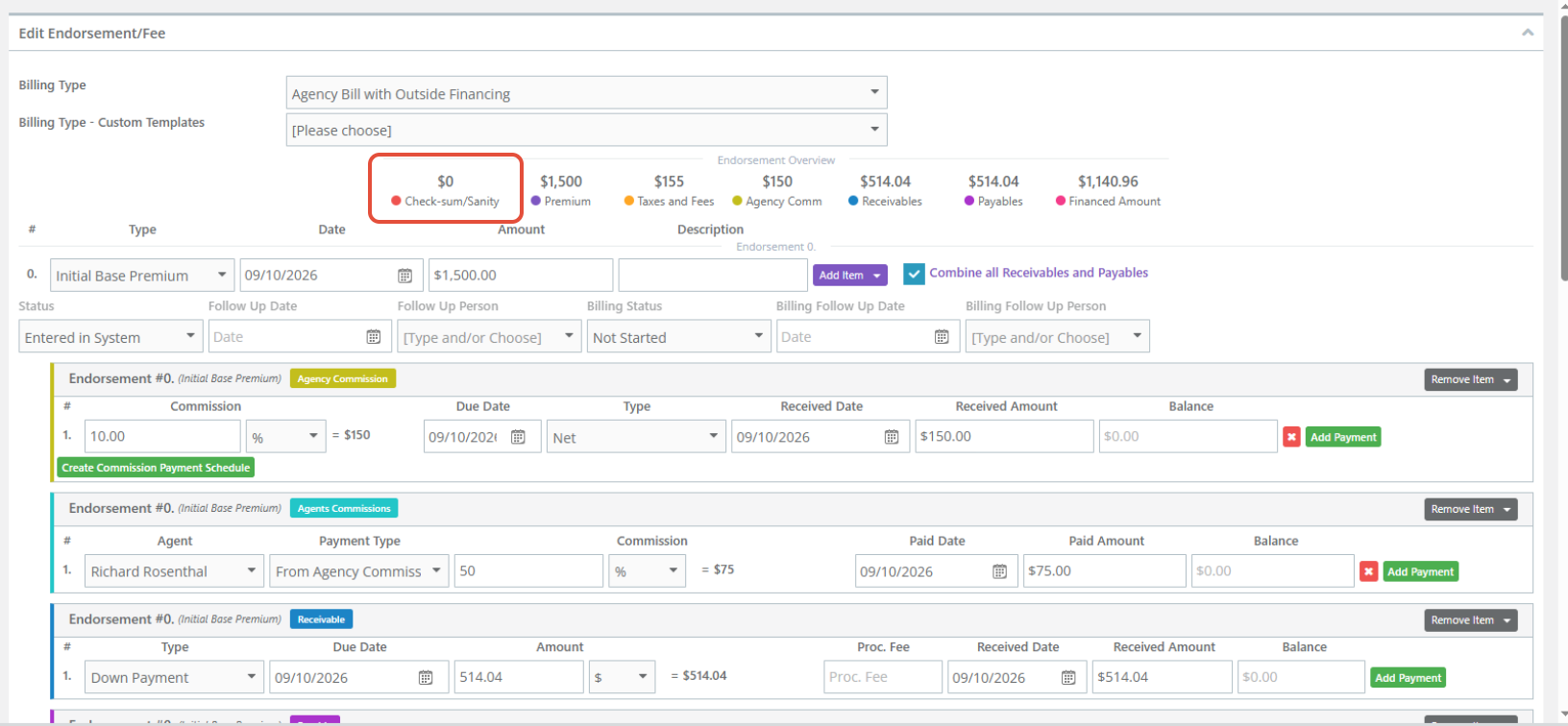
Check the Check-Sum/Sanity
After creating or adjusting the transaction, verify the Check-Sum/Sanity.
Check-Sum/Sanity must be 0.
If there is a number other than 0 in the Check-Sum/Sanity, something in the transaction has been entered incorrectly and should be reviewed before continuing.
Best Practices
When handling a cancellation, return premium, or correction:
- Don't edit an existing generated transaction to represent a later change.
- Create a Negative Endorsement for return or reduced premium.
- Create a Positive Endorsement for additional premium.
- Use a Non-Premium-Bearing Endorsement when only commission needs to change.
- Allow Momentum to generate the corresponding negative accounting for a normal return-premium transaction.
- Remember that the insured may be owed the full return premium even though the agency receives less from the MGA or carrier because of return commission.
- For premium-financed policies, determine where the return premium is actually going before processing the accounting.
- If the MGA or carrier sends the return premium directly to the finance company, remove the Receivable and Payable and process the applicable return commission.
- Follow the actual movement of the money.
- Confirm Check-Sum/Sanity 0 before completing the transaction.
Summary
When a cancellation or policy change creates return premium, don't go back and rewrite the original generated transaction.
Create a new endorsement representing what changed.
For a normal return-premium transaction, Momentum creates the accounting in reverse, including a negative Receivable, negative Payable, and applicable return commission.
For a premium-financed policy, first determine where the return premium is actually going. If the MGA or carrier returns the premium directly to the finance company, remove the Receivable and Payable and process only the applicable return commission through the agency.
The two principles to remember are:
Create a new transaction representing the change—don't rewrite the original transaction.
Follow the actual movement of the money.
Was this article helpful?
That’s Great!
Thank you for your feedback
Sorry! We couldn't be helpful
Thank you for your feedback
Feedback sent
We appreciate your effort and will try to fix the article