Overview
Text messaging in Momentum AMS works the same regardless of the provider (RingCentral, Twilio, or other integrations). This guide covers how to send messages, where they are stored, and how they relate to insured records.
Text messaging in Momentum AMS works the same regardless of the provider (RingCentral, Twilio, or other integrations). This guide covers how to send messages, where they are stored, and how they relate to insured records.
How Text Messaging Works
Once your SMS integration is connected:
- Text messages are tied to insured records
- All messages are:
- Logged automatically
- Stored in activity history
- Conversations can be continued from the SMS chat area
✔ No workflow differences between providers
✔ Same process whether using RingCentral, Twilio, or another SMS integration
✉️ Method 1: Send a Text from an Insured Record
- Navigate to the Insured’s Profile
- Click Add Note
- Enter your message
- Select Send as SMS
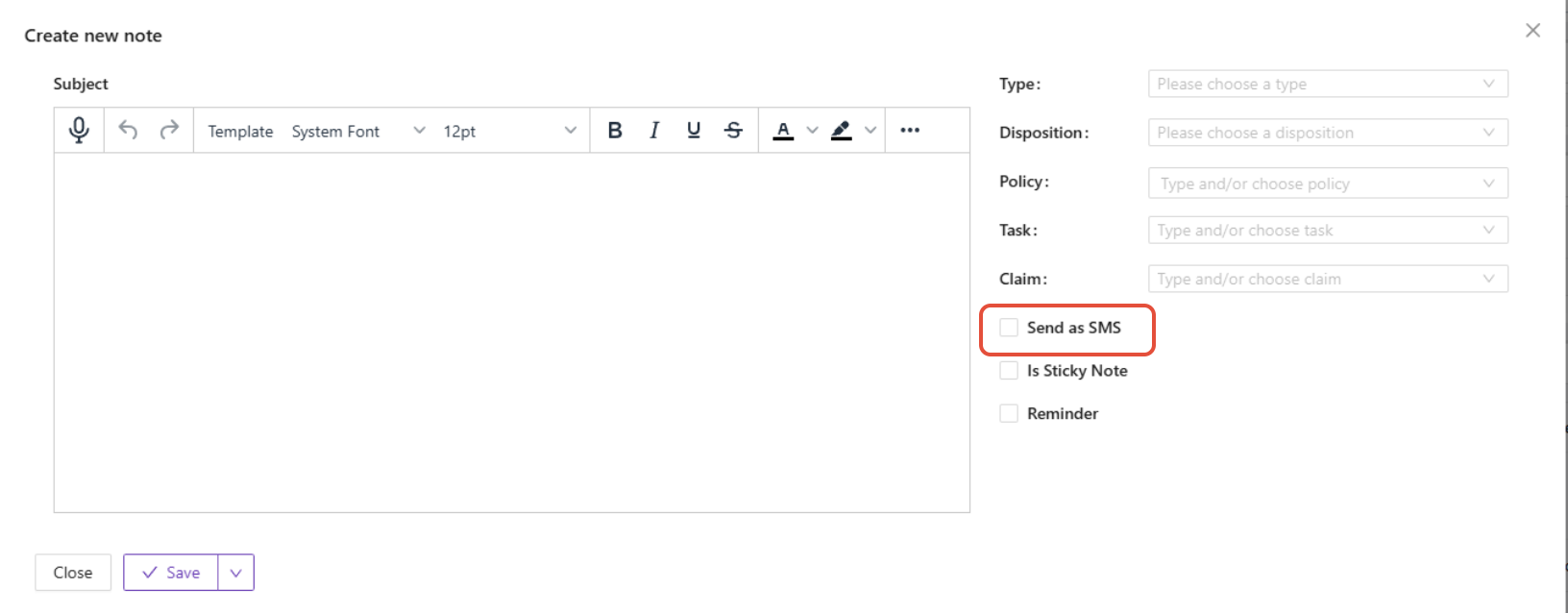
- Save the note
What Happens Next
- The message is sent from your connected SMS number
- The message is saved as:
- A Note
- An Activity History record
Method 2: Send from Text Messaging / SMS Module
- Go to Text Messaging / SMS
- Select an existing conversation or start a new one
- Send or reply to messages
What This Area Is For
- Replying to incoming messages
- Managing ongoing conversations
- Viewing message history
Message Tracking & History
All messages—regardless of how they are sent—are:
- Logged automatically
- Linked to the insured
- Viewable in:
- Activity History
- Notes
✔ Ensures full communication tracking
✔ Helps with compliance and documentation
⚠️ Important Notes
- The process is identical across all SMS providers
- Differences between providers only affect:
- Setup
- Phone number configuration
- Compliance requirements (outside of AMS workflow)
✅ Best Practices
- Always send messages from the insured record when possible
- Use clear, professional language (messages are logged permanently)
- Confirm phone numbers are correct before sending
- Use mass texting carefully for compliance and relevance
Summary
Momentum AMS allows you to:
- Send text messages directly from insured records
- Use a centralized SMS module for conversations and campaigns
- Automatically track all communication
- Work consistently across all SMS platforms
Was this article helpful?
That’s Great!
Thank you for your feedback
Sorry! We couldn't be helpful
Thank you for your feedback
Feedback sent
We appreciate your effort and will try to fix the article